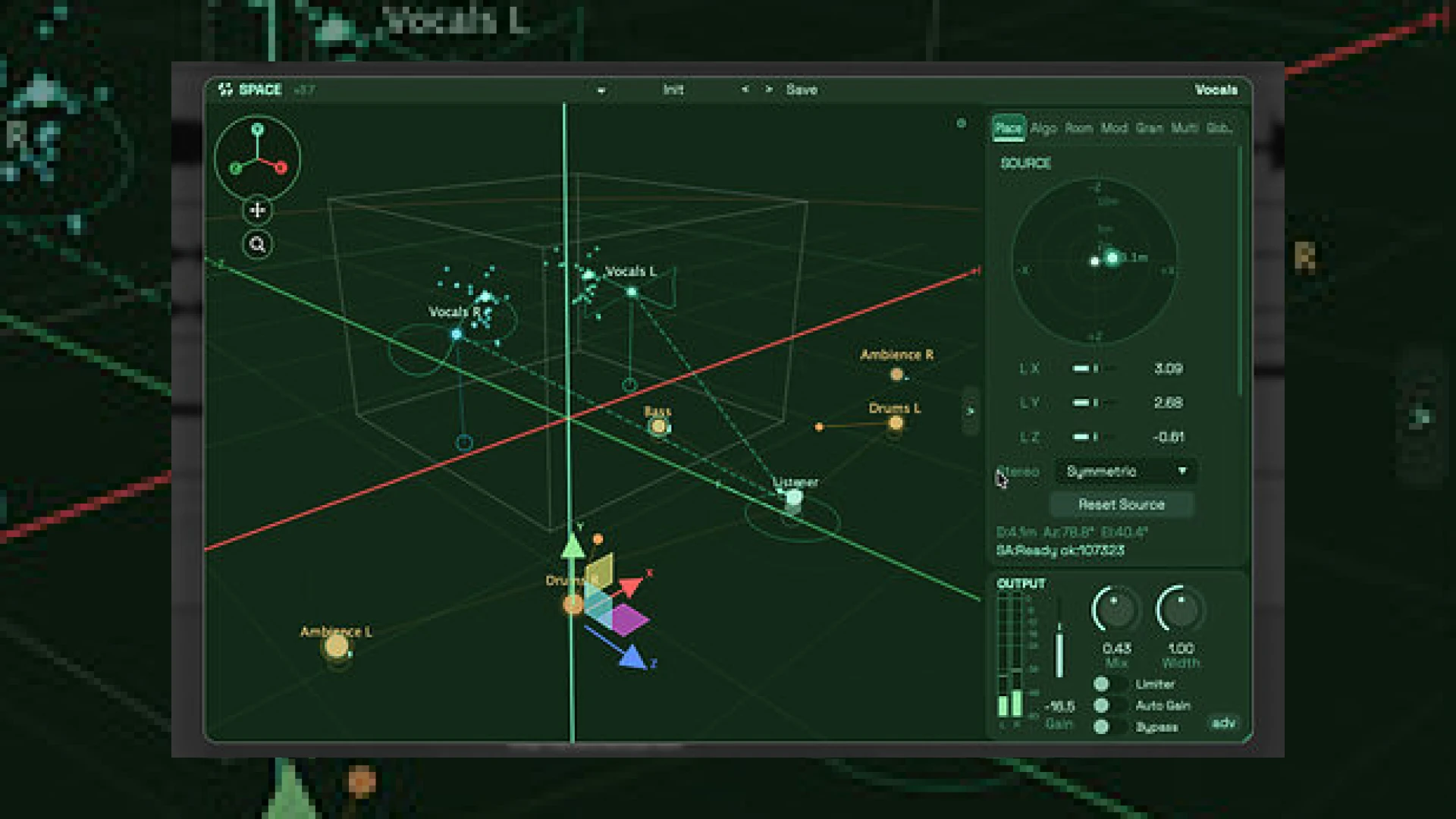
Visual context for Audiocube launch Audiocube Space.
With the recent audiocube launch audiocube space, immersive music production has taken a massive leap forward. As spatial audio formats continue to transition from a niche novelty to an industry standard, mixing and mastering engineers are constantly searching for tools that streamline the 3D acoustic workflow. Traditionally, setting up multichannel arrays and managing complex object-based routing within traditional Digital Audio Workstations (DAWs) has been a highly tedious, CPU-intensive process. This new tool addresses those pain points directly, embedding a complete, self-contained 3D environment right inside your favorite host.
For modern producers looking to expand their soundscapes, mastering these emerging tools is crucial. Staying ahead of the curve means understanding how to place elements in a three-dimensional field without sacrificing phase coherence or mono compatibility. To explore more about cutting-edge production workflows and professional mastering techniques, feel free to dive into our comprehensive collection of SM Mastering Audio Articles.
How the Audiocube Launch Audiocube Space Redefines Spatial Mixing
The news of the audiocube launch audiocube space has sparked excitement across both stereo and multi-speaker mixing communities. Operating as a VST3, AU, and AAX plug-in, Space delivers full 360-degree sound placement, complex acoustic simulation, and multichannel mixing capabilities for formats up to 9.1.6. By integrating these processes into a single interface, it eliminates the need for complicated external bining tools or auxiliary routing setups that often disrupt the creative flow.
One of the most notable workflow improvements introduced in this release is the multi-instance linking feature. Rather than manually jumping between different tracks to adjust individual spatial positions, engineers can link multiple instances of the plugin. This creates a unified control hub where you can visualize, automate, and reposition multiple sound sources simultaneously from a single, intuitive window. This level of visual coherence is reminiscent of the advanced system control systems designed by industry giants like Universal Audio, which prioritize ergonomics alongside pure sonic quality.
The Physics of Sound: Inside the Ripple Engine
At the core of this plugin lies Audiocube’s proprietary Ripple Engine. Rather than simply panning sounds left and right or using basic delay lines, the engine mathematically simulates how physical sound waves interact with physical obstacles, boundaries, and construction materials. This is why the audiocube launch audiocube space has captured the attention of post-production specialists and sound designers alike.
Users can place static sound sources anywhere in the virtual room, or they can draw custom motion paths to generate realistic dynamic movements. The onboard acoustic environment generator offers ten distinct room shapes and a selection of twelve simulated construction materials (such as concrete, wood, or glass). This allows you to realistically mimic how high frequencies are absorbed or how low-mid resonances build up in real-world environments. Additionally, an integrated “Cloud” effect utilizes granular processing, allowing users to stretch, fragment, and diffuse incoming audio into lush, experimental textures and ambient soundscapes.
Technical Specifications
| Name | Primary Use | Price | Rating |
|---|---|---|---|
| Audiocube Space | 3D Spatial Placement, Acoustic Simulation, Multichannel Mixing (up to 9.1.6) | $149 (Launch Promo Available) | 4.8 / 5.0 |
Practical Studio Workflow Tips for Immersive Mixing
Ever since the official announcement of the audiocube launch audiocube space, engineers have been experimenting with how to integrate its power into daily sessions. Here are some practical tips to maximize the plug-in’s potential:
- Keep the Low End Centered: Even when mixing in 9.1.6 or 7.1.4, ensure your sub-bass elements (like kick drums and sub-bass synths) remain relatively centered. Use Space’s positioning tool to keep low frequencies grounded while letting high-frequency percussion elements drift along custom motion paths.
- Use the Cloud Effect for Depth: If a dry vocal track or acoustic guitar feels too static, send a portion of the signal to a parallel aux track hosting Space. Apply the “Cloud” granular effect with a wide, diffused path to create a lush, atmospheric pad that sits naturally behind the dry signal.
- Leverage the Built-in Master Section: Make full use of the on-board parallel processing and stereo-width controls. If your spatial field starts to feel unbalanced, activate the automatic gain compensation and the built-in limiter to prevent transient peaks from clipping your master bus.
Conclusion
The audiocube launch audiocube space represents a significant step forward in making immersive audio production accessible to all. By merging spatial positioning, modular room physics, granular sound design, and master-bus dynamics into a singular, highly cohesive DAW interface, Audiocube has successfully demystified the complexities of 3D mixing. Whether you are prepping a track for Dolby Atmos or simply trying to carve out a wider, more realistic stereo image, this tool provides the analytical depth and creative freedom required for modern professional production.
Frequently Asked Questions (FAQ)
What DAWs support Audiocube Space?
Audiocube Space is fully compatible with any major DAW that supports VST3, AU, or AAX plug-in formats. This includes popular hosts such as Pro Tools, Logic Pro, Ableton Live, Cubase, and Reaper.
Can I use Audiocube Space if I only mix in stereo?
Yes. While Audiocube Space supports massive multi-speaker configurations up to 9.1.6, its advanced Ripple Engine and granular Cloud features work exceptionally well for widening, positioning, and adding realistic depth to traditional stereo mixes.
What makes the Ripple Engine different from standard reverb plug-ins?
Standard reverbs typically use algorithmic delay networks or static impulse responses. The Ripple Engine dynamically calculates how sound propagates in real time based on your selected room shape, its volume, and twelve different simulated construction materials, resulting in a more realistic sense of physical space.
🛒 Official Product Info & Where to Buy
Check full technical specs, pricing, and purchase options directly from the official manufacturer or authorized dealer for Audiocube launch Audiocube Space.

Written by SM Mastering
Official content on sound engineering, mixing, mastering, and advanced electronic production by SM Mastering.