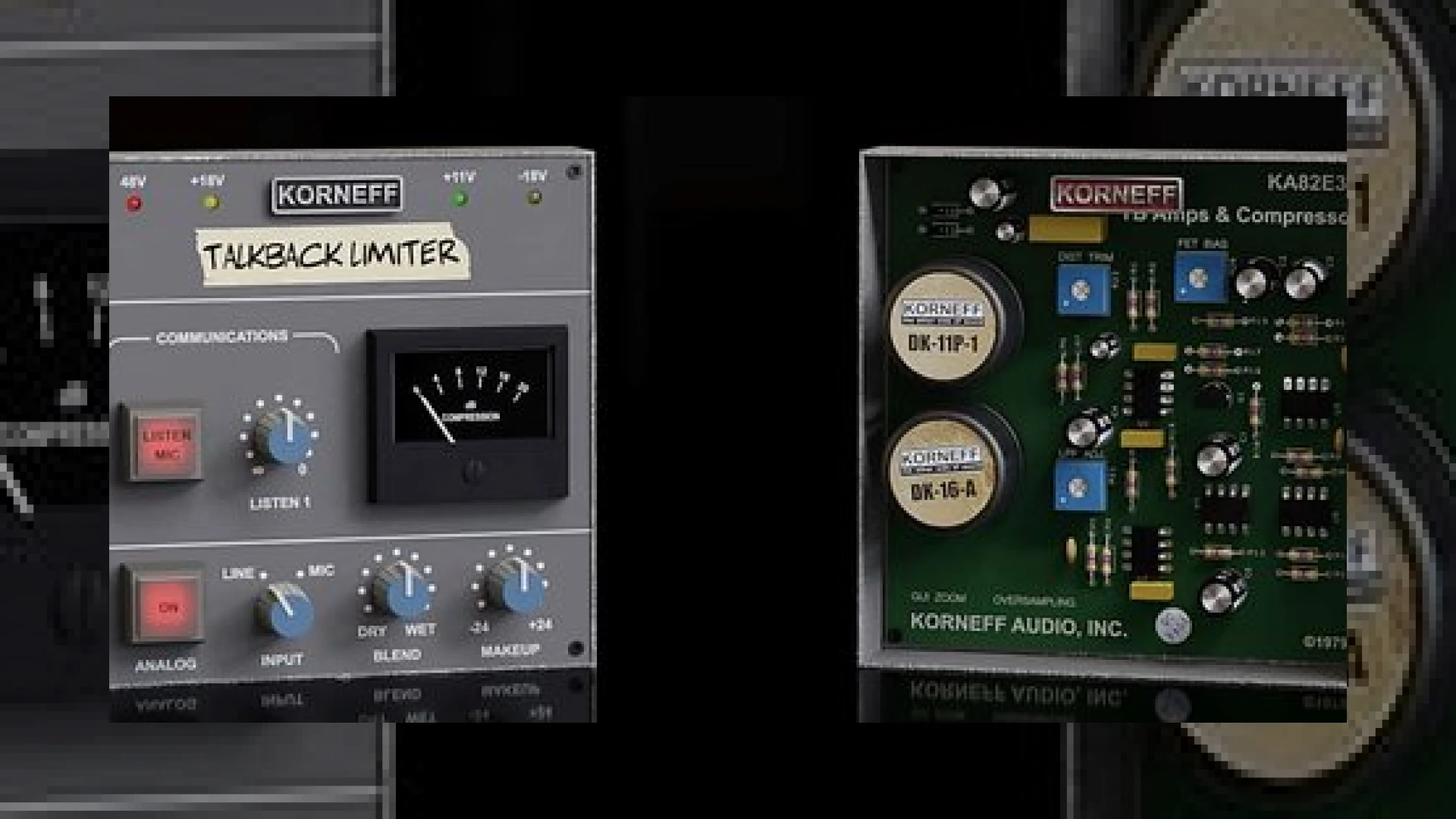
Visual context for Talkback Limiter from Korneff Audio.
The legendary sound of the SSL Listen Mic Compressor has shaped countless records since the 1980s. Originally designed as a utilitarian safety device to prevent loud signals from damaging studio monitors when talkback mics were open, it famously became a production powerhouse when engineer Hugh Padgham accidentally routed Phil Collins’ drum kit through it. The result was a smashed, explosive room tone that defined an era. Today, software recreations allow us to easily harness this chaos in the digital domain, which is why the talkback limiter from korneff audio has captured the attention of top mixing engineers looking for that elusive, aggressive mojo.
The Sonic Signature of the Talkback Limiter from Korneff Audio
Korneff Audio is renowned for producing plugins that do not merely mimic the curves of hardware, but also capture their physical quirks, nonlinearities, and structural vibe. When processing transient-heavy material, the talkback limiter from korneff audio behaves like a classic hardware unit on steroids. It grabs the signal with an ultra-fast attack and a brutal compression ratio that can reach up to 100:1. This aggressive attitude makes it perfect for parallel drum busses, room mics, and even gritty vocal parallel chains.
Unlike standard clean digital limiters, this plugin thrives on saturation. To get a better sense of how it compares to standard studio tools, let us look at its primary specifications:
| Specification | Details |
|---|---|
| Name | Talkback Limiter from Korneff Audio |
| Use | Aggressive compression, saturation, parallel drum processing |
| Price | $39.99 |
| Rating | 4.8 / 5.0 |
Key Features and Under-the-Hood Controls
At first glance, the user interface features chunky, SSL-style knobs and buttons that scream vintage console workflow. You can quickly engage the processing via the “Listen Mic” button, adjust the compression threshold, and switch between two input sensitivity levels using the “Mic/Line” switch. There is also a “Makeup” gain knob to compensate for the extreme gain reduction, and a “Blend” control to let you easily implement parallel compression directly inside the plugin. If you want to push the emulation further, the “Analog” button increases the nonlinear distortion characteristics modeled from real-world hardware components.
However, if you click on the Korneff logo, you will discover that the talkback limiter from korneff audio features a secondary “under-the-hood” control panel. This back panel lets you tweak the compressor’s distortion characteristics, alter the compression curve, and adjust a high-pass filter on the sidechain detector. This sidechain filter is crucial for modern digital workflows because it prevents low-end energy (like a heavy sub-kick) from triggering massive gain reduction, allowing you to keep your low end intact while smashing the mid-range and top-end transients.
For engineers who appreciate how analog modeling behaves in a modern DAW, comparing this plugin to other emulations by brands like Universal Audio reveals just how much control Korneff gives the user. While some emulations stick strictly to the original hardware limitations, Korneff expands the feature set for modern workflows.
Practical Studio Workflow Tips
Integrating this aggressive processor into your mixing template requires a bit of finesse. Here are a few ways we utilize it at the studio:
- The Explosive Drum Parallel: Send your stereo drum room mics to an auxiliary track. Insert the plugin, set the ratio to maximum, and turn up the input until you achieve 15–20dB of gain reduction. Use the internal blend control to mix this smashed signal back into your main drum bus at around 15–20% wet. This adds massive sustain to the snare drum decay without destroying the initial transients of your close mics.
- Vocal Grit and Edge: For rock and indie vocal tracks, run a parallel path through the limiter. Enable the “Analog” distortion button to saturate the mid-range. Blend it gently beneath the clean lead vocal to help it cut through a dense wall of guitars.
- Taming Low-End Pump: Always flip the virtual unit over to access the back panel. Set the sidechain high-pass filter to around 120Hz to keep kick drums or bass guitars from making the entire mix pump unnaturally.
Conclusion
Ultimately, the talkback limiter from korneff audio is more than just a novelty recreation of a vintage console quirk. It is a highly versatile saturation and transient-shaping toolkit designed for the modern hybrid mixing environment. Whether you are looking to replicate the iconic 80s drum sound or simply want to inject some analog saturation into sterile digital tracks, this affordable plugin is an essential addition to your processing toolkit. To explore more in-depth reviews of vintage emulations and production techniques, check out our collection of SM Mastering Audio Articles.
Frequently Asked Questions
Is the Talkback Limiter from Korneff Audio suitable for mastering?
While it is primarily designed as a creative mixing tool for adding heavy compression and saturation, it can be used in mastering as a parallel processor in very small amounts (under 5% wet) to add subtle harmonic excitement and mid-range density to aggressive genres like rock, punk, or metal.
What formats are supported by this plugin?
The plugin is fully compatible with macOS and Windows systems and is available in VST3, AU, and AAX formats, making it compatible with all major digital audio workstations (DAWs) like Pro Tools, Logic Pro, Ableton Live, and Reaper.
How does the Blend control affect the signal path?
The Blend control acts as a wet/dry mix knob. This allows you to perform parallel compression directly on the track where the plugin is inserted, eliminating the need to set up complex auxiliary routing paths within your DAW session.
🛒 Official Product Info & Where to Buy
Check full technical specs, pricing, and purchase options directly from the official manufacturer or authorized dealer for Talkback Limiter from Korneff Audio.

Written by SM Mastering
Official content on sound engineering, mixing, mastering, and advanced electronic production by SM Mastering.