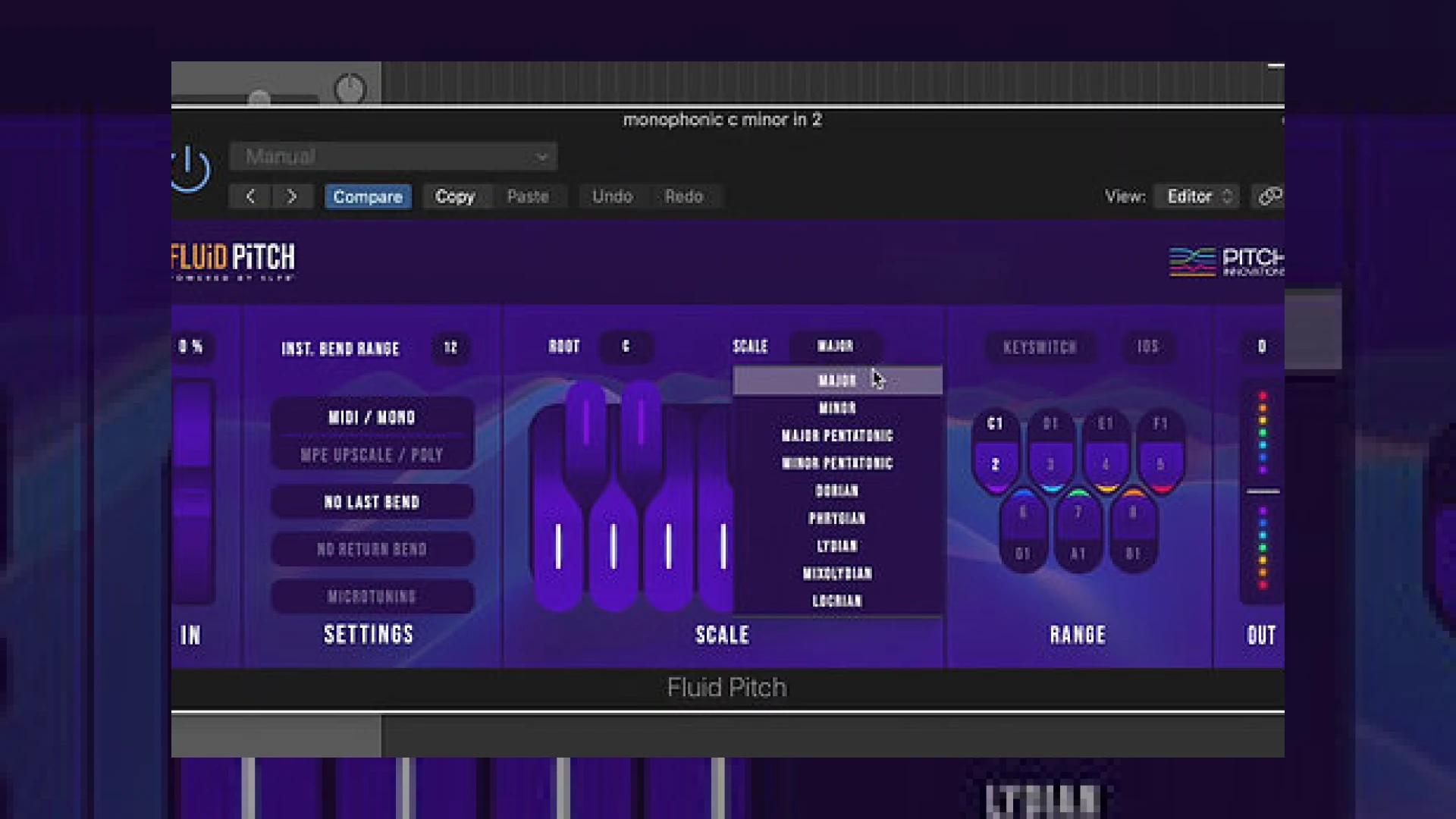
Visual context for Fluid Pitch adds MPE to your keyboard.
As virtual instruments become increasingly sophisticated, the tools we use to control them must also evolve. Traditional MIDI keyboards have long been constrained by the limitations of standard pitch wheels, which uniformly bend every active note by a set interval—usually two semitones. This behavior rarely accommodates complex harmonic arrangements or scale-specific pitch-bending. Fortunately, Pitch Innovations, a company founded by Bollywood composer and programmer Krishna Chetan, has introduced a groundbreaking solution. Many modern producers are finding that utilizing fluid pitch adds mpe to your keyboard, transforming any standard hardware controller into an expressive, polyphonic powerhouse.
When you are polishing a mix at SM Mastering Audio Articles, capturing the nuances of human performance is crucial. Fluid Pitch addresses this by functioning as a MIDI utility plugin that sits between your MIDI keyboard and your virtual instrument. By analyzing the scale you are playing in, it scales the pitch-wheel data dynamically. For instance, if you are playing the third note of a minor scale, moving the pitch wheel up might bend the note by two semitones while moving it down only bends it by one. This ensures that every bend remains completely in key, offering a selection of nine different scales, including harmonic major/minor, pentatonic major/minor, and various traditional modes.
How Fluid Pitch Adds MPE to Your Keyboard
The standout feature of this software is its innovative “MPE Upscale” mode. Historically, MIDI Polyphonic Expression (MPE) required specialized and expensive hardware controllers to allow per-note pitch bending. However, understanding how fluid pitch adds mpe to your keyboard reveals a clever workaround. By translating monophonic wheel movements into individual voice messages across multiple MIDI channels, the plugin enables polyphonic pitch bending on a standard keyboard. This means you can hold down a chord, bend a single voice, and keep the remaining notes perfectly stable.
Additional product view and interface angle for Fluid Pitch adds MPE to your keyboard.
This level of control is particularly useful when working with high-end synthesizers or orchestral libraries in DAWs like Ableton Live. Instead of spending hours drawing complex automation curves, you can perform organic vibratos and pitch slides directly from your hardware keyboard while the plugin handles the scale locking in real-time.
Technical Specifications
To help you understand the integration of this utility in your studio, here is a quick overview of its specifications:

Additional product view and interface angle for Fluid Pitch adds MPE to your keyboard.
| Specification | Details |
|---|---|
| Product Name | Fluid Pitch by Pitch Innovations |
| Primary Use | MIDI Pitch-Bend Scaling & MPE Emulation |
| Supported Scales | 9 Built-in Scales (Harmonic, Pentatonic, Modes) with Custom Editing |
| Price | $49 USD (Standard Pricing) |
| SM Mastering Rating | 4.8 / 5 Stars |
Practical Studio Workflow Tips
To get the most out of this plugin during your production and mixing stages, consider these expert workflow tips:
- Keep Your Hands on the Keys: Use the custom pitch-bend range settings to quickly jump between intervals like thirds, fifths, or full octaves while remaining strictly in key. This is incredibly useful for simulating realistic guitar slides or brass swells.
- Combine with Non-MPE Synths: Even if your synthesizer does not natively support MPE, you can set it to Multi-Timbral mode to receive the multi-channel MIDI data generated by Fluid Pitch. This seamless integration demonstrates how fluid pitch adds mpe to your keyboard without requiring a hardware overhaul.
- Refine Your Master: When preparing tracks for professional mastering, organic pitch variations can add a sense of depth and three-dimensionality to your stereo image. Use polyphonic pitch bends on synth pads to create natural chorus effects.
Conclusion
Pitch Innovations has delivered an incredibly smart tool that bridges the gap between classic MIDI hardware and modern expressive performance. Ultimately, seeing how fluid pitch adds mpe to your keyboard makes it a must-have utility for any producer looking to elevate their MIDI arrangements. By locking your pitch bends to musical scales and unlocking per-note control, it saves countless hours of post-performance editing and brings real-time expressiveness back to your fingertips.

Additional product view and interface angle for Fluid Pitch adds MPE to your keyboard.
Frequently Asked Questions
Does Fluid Pitch work with any MIDI keyboard?
Yes, Fluid Pitch works with any standard MIDI controller equipped with a pitch bend wheel. It processes the outgoing MIDI data from your hardware before it reaches your virtual instruments.
Do my software synthesizers need to support MPE?
While MPE-compatible synthesizers offer the easiest setup, you can also use Fluid Pitch with non-MPE multi-timbral synths by routing individual MIDI channels to multiple instances of the same instrument.
Additional product view and interface angle for Fluid Pitch adds MPE to your keyboard.
Can I customize the scale notes inside Fluid Pitch?
Absolutely. Much like modern pitch-correction software, Fluid Pitch allows you to manually activate or deactivate specific notes within your chosen scale to create highly customized microtonal maps.
Additional product view and interface angle for Fluid Pitch adds MPE to your keyboard.
🛒 Official Product Info & Where to Buy
Check full technical specs, pricing, and purchase options directly from the official manufacturer or authorized dealer for Fluid Pitch adds MPE to your keyboard.

Written by SM Mastering
Official content on sound engineering, mixing, mastering, and advanced electronic production by SM Mastering.