Visual context for Teletone Audio Ondine.
Here at SM Mastering, we spend our days analyzing the subtle nuances of transient response, harmonic saturation, and spatial depth. When a new virtual instrument hits the market that promises to inspire producers and mix engineers alike, our ears perk up. In this review, we take a close technical look at how **teletone audio ondine** performs in a professional DAW environment, exploring its architecture, sonic character, and workflow integration. For more insights on virtual instruments and mixing techniques, be sure to visit our comprehensive archive of SM Mastering Audio Articles.
## Unpacking the Architecture of Teletone Audio Ondine
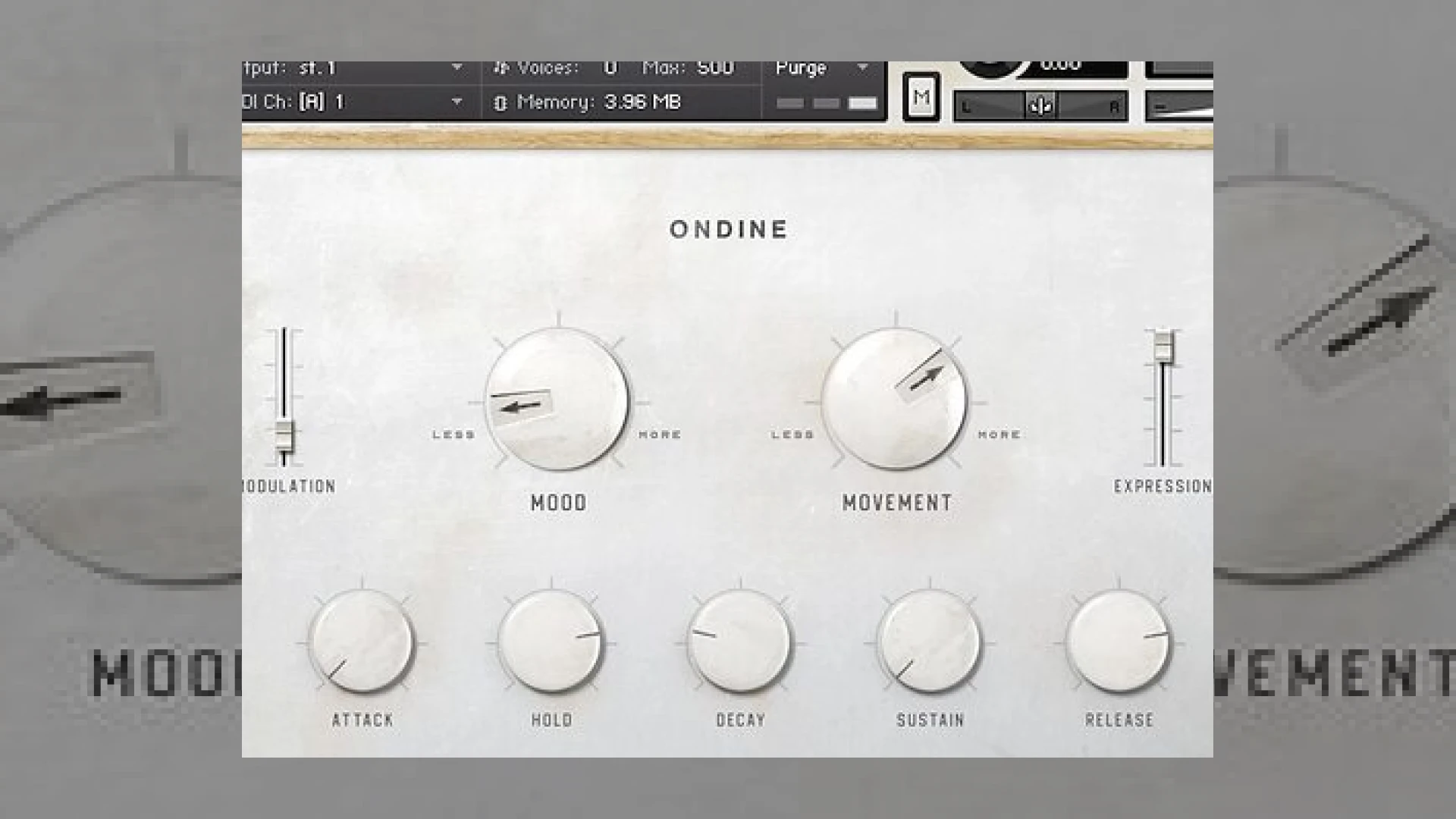
Developed as a dedicated Kontakt-based instrument, **teletone audio ondine** draws its foundational DNA from rare, vintage synth hardware. Rather than bombarding the user with endless menus and complex routing matrices, this library embraces a curated, streamlined workflow. The graphical user interface centers around two primary macro knobs labeled *Mood* and *Movement*, flanked by dedicated *Modulation* and *Expression* sliders.
In professional mixing, having macro controls that dynamically shift multiple internal parameters simultaneously is a massive time-saver. For a deeper dive into modern processing standards, you can check out the advanced tools offered by Ableton to see how they handle modulation routing.
## Studio Workflow Tips for Mixing with Teletone Audio Ondine
Integrating **teletone audio ondine** into a dense mix requires careful consideration of its frequency spectrum and transient profile, especially when utilizing its built-in tape warble and lo-fi saturation.
* **Control the Low-End:** Vintage-sampled instruments often possess unpredictable low-frequency energy. Insert a high-pass filter around 30Hz to 40Hz to keep the sub-bass clean and leave headroom for your kick and bass tracks.
* **Automate the Macro Controls:** The *Movement* and *Mood* parameters are designed for automation. Draw in slow, subtle automation curves during verse-to-chorus transitions to keep the synth textures evolving organically.
* **Complementary EQ:** Because **teletone audio ondine** leans toward warm, hypnotic, and dusty tones, a gentle high-shelf boost above 8kHz can help the instrument cut through a modern pop or cinematic mix without sounding harsh.
## Technical Specifications
| Feature | Detail |
| :— | :— |
| **Product Name** | Teletone Audio Ondine |
| **Primary Use** | Cinematic and Vintage Synthesizer Virtual Instrument |
| **Price** | Check Official Manufacturer Website |
| **SM Mastering Rating** | 4.8 / 5 |
## Conclusion
Ultimately, **teletone audio ondine** succeeds by offering immediate musical inspiration without sacrificing sonic character. Its carefully captured vintage sources and intuitive macro design make it an exceptional tool for film composers, electronic music producers, and modern beatmakers looking for warmth, nostalgia, and organic motion in their tracks.
## Frequently Asked Questions
### What platform is required to run Teletone Audio Ondine?
This instrument runs inside Native Instruments’ Kontakt platform (either the full retail version or Kontakt Player). Ensure your software is up to date to maintain optimal performance within your DAW.
### How does the Mood control affect the patches?
The *Mood* macro is dynamically mapped depending on the active patch. In some presets, it controls the amount of harmonic distortion, while in others, it scales the internal reverb, delay, or white noise generator levels.
### Can I fine-tune the envelope of the sounds?
Yes, along the bottom of the user interface, traditional ADSR (Attack, Decay, Sustain, Release) controls are readily available, allowing producers to easily shape the transient and tail of sustained pads and leads.
🛒 Official Product Info & Where to Buy
Check full technical specs, pricing, and purchase options directly from the official manufacturer or authorized dealer for Teletone Audio Ondine.
Written by SM Mastering
Official content on sound engineering, mixing, mastering, and advanced electronic production by SM Mastering.