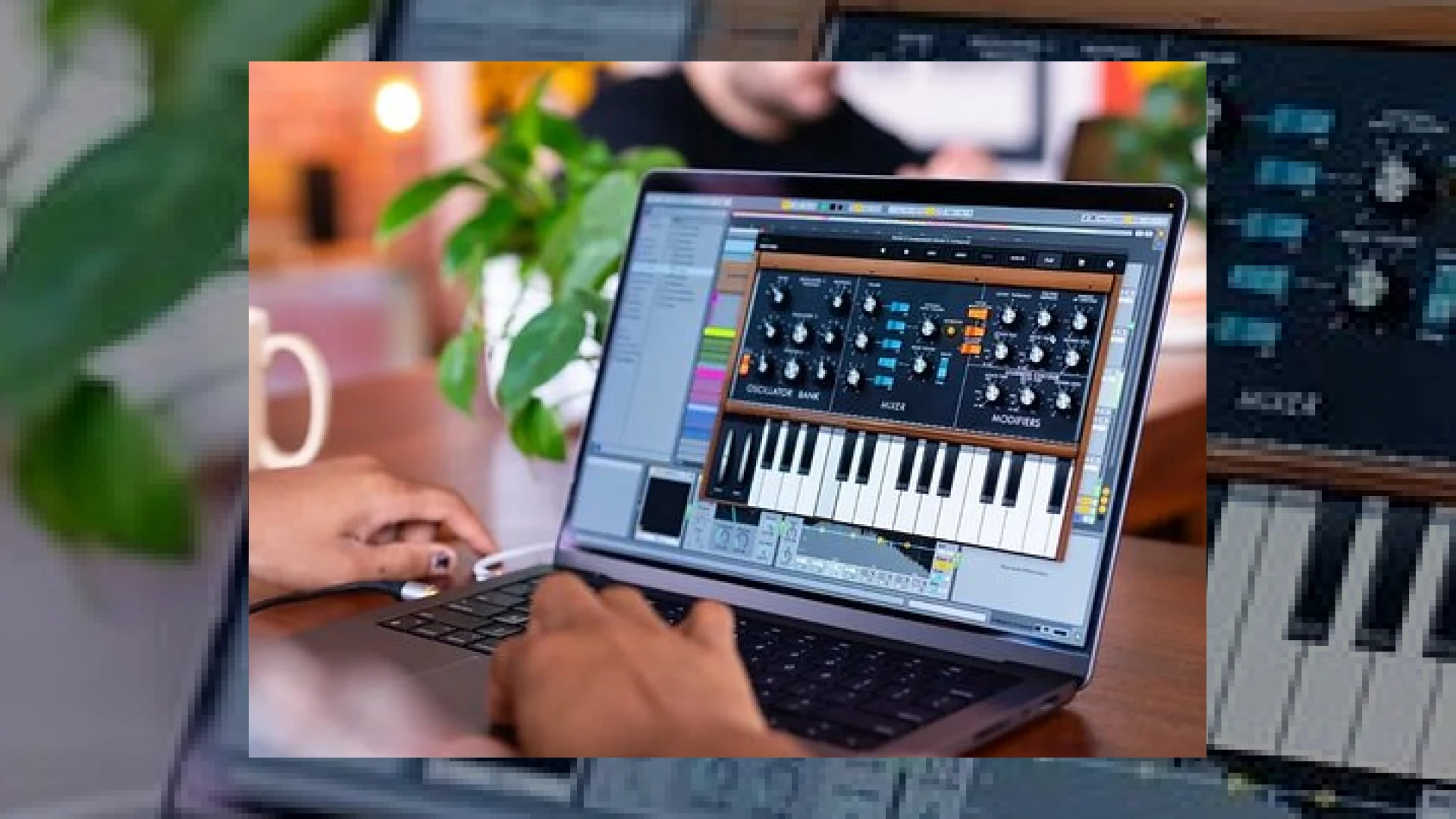
Visual context for Minimoog Model D macOS app out now.
When legendary analog warmth meets modern desktop integration, music producers take notice. Moog has officially expanded its software ecosystem, and the minimoog model d macos app out now release brings one of the most iconic monophonic synthesizers in music history directly to Apple Silicon and Intel-based Macs. As mix and mastering engineers at SM Mastering Audio Articles, we know how crucial authentic analog emulation is for injecting character, weight, and harmonic saturation into digital productions. This transition from iOS to native macOS compatibility means producers can finally route legendary Moog filter sweeps directly through their favorite desktop digital audio workstations.
Exploring the Features of the minimoog model d macos app out now
The arrival of the minimoog model d macos app out now update bridges the gap between mobile sketching and serious studio production. Operating seamlessly as an Audio Unit v3, VST3, or standalone application, this software meticulously models every nuance of the original hardware circuit. Beyond the classic ladder filter and robust oscillator architecture, Moog has packed the software with modern workflow enhancements. You get up to four-note polyphony, a flexible arpeggiator, a built-in stereo ping-pong delay, and a real-time looping recorder. To ensure your low-end translations remain pristine before sending tracks to a professional mixing and mastering facility, these built-in spatial and temporal effects allow for intricate sound design right inside the plug-in.
| Feature | Details |
|---|---|
| Name | Minimoog Model D App |
| Use | Monophonic / Polyphonic Synthesizer Instrument |
| Price | $29.99 (£25.99) |
| Rating | 4.9 / 5 |
Studio Workflow Tips for the Minimoog Model D on Mac
Integrating the minimoog model d macos app out now release into your mixing sessions requires careful gain staging to preserve that unmistakable analog bite. Because the instrument features a deeply resonant filter, keeping an eye on your peak levels is essential to prevent unwanted digital clipping before hitting your master bus. Here are a few professional tips to maximize your workflow:
- Utilize Automation: Take advantage of the smooth parameter curves in your DAW to automate filter cutoff and resonance changes in real-time.
- Layering Basses: Use the four-note polyphony mode to create rich, wide chord stabs, then layer a dedicated mono sub-bass underneath for maximum low-end translation.
- Processing Chain: Follow up the synth with subtle tape saturation and compression to glue the software instrument into your mix effortlessly.
Why the minimoog model d macos app out now Release Matters for Producers
The excitement surrounding the minimoog model d macos app out now announcement is entirely justified. Accessibility to high-end vintage emulation has never been easier or more affordable. Whether you are crafting cinematic soundscapes, classic funk basslines, or modern electronic music, this plugin delivers timeless tone without requiring hardware maintenance.
Frequently Asked Questions
Is the Minimoog Model D macOS app compatible with all DAWs?
Yes, the app supports Audio Unit v3 formats natively, alongside VST3 and AUv2 compatibility wrappers, making it fully functional in major digital audio workstations like Logic Pro, Ableton Live, Pro Tools, and Cubase.
Can I use my existing iOS presets on the Mac version?
Absolutely. Because the ecosystem is unified, you can easily transfer and sync your custom patches and sound banks seamlessly across your iPhone, iPad, and Mac devices.
Does the Mac app require an internet connection to run?
Once downloaded and authorized through the Apple App Store, the application operates entirely offline, ensuring reliable performance during live performances and studio sessions.
🛒 Official Product Info & Where to Buy
Check full technical specs, pricing, and purchase options directly from the official manufacturer or authorized dealer for Minimoog Model D macOS app out now.
Written by SM Mastering
Official content on sound engineering, mixing, mastering, and advanced electronic production by SM Mastering.