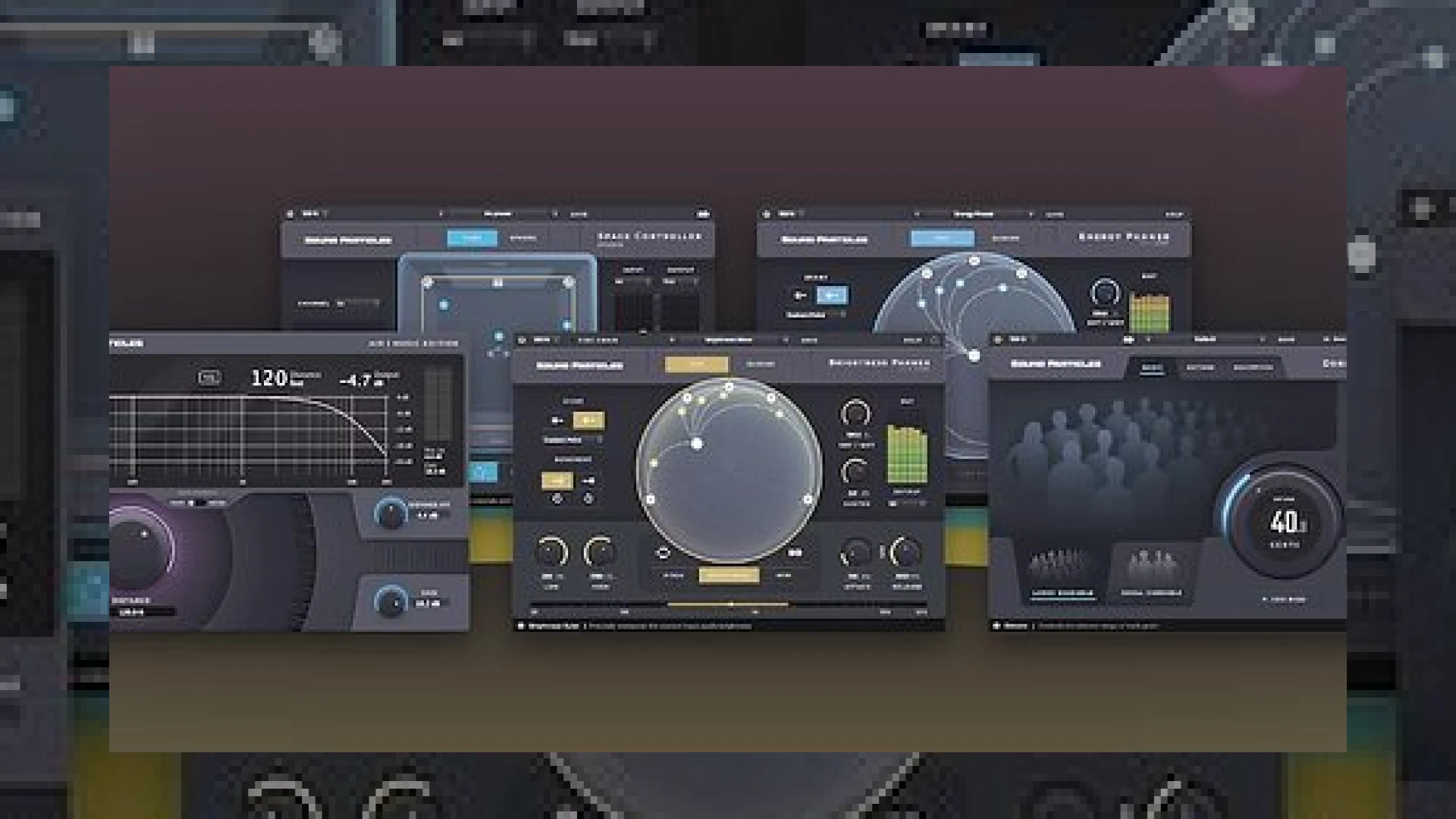
Visual context for Sound Particles introduce Spatial Music Bundle.
Immersive audio formats continue to reshape how we experience recorded music, pushing both mix engineers and producers to adopt advanced software tools. Recognizing this industry shift, when **sound particles introduce spatial music bundle**, the standard workflow for multi-channel mixing undergoes a significant evolution. At SM Mastering, we constantly evaluate cutting-edge tools to ensure your mixes translate seamlessly across Dolby Atmos, binaural, and traditional stereo systems. This comprehensive package brings together some of the most innovative spatial processing tools available today, streamlining the path from a basic multi-track session to a fully three-dimensional sonic experience.
Why Sound Particles Introduce Spatial Music Bundle for Modern Producers
Transitioning from standard stereo mixing to immersive audio can often feel overwhelming without the right utility plug-ins. When **sound particles introduce spatial music bundle**, they provide a curated selection of processors designed specifically to tackle complex panning, depth, and spatialization challenges. The suite includes Energy Panner, Brightness Panner, Space Controller Studio, Density, and Air | Music Edition. Each plug-in serves a distinct purpose in the spatial mixing chain, allowing engineers to manipulate sound based on amplitude, frequency, physical movement, or acoustic simulation.
To achieve professional results with these advanced processors, your monitoring environment and gain staging must be meticulously calibrated. You can read more about foundational mixing techniques over at our SM Mastering Audio Articles archive to get your tracks prepped before spatial encoding. Additionally, integrating hardware controllers endorsed by industry leaders like Avid can greatly improve your tactile interaction with complex immersive panning matrices.
Key Plug-ins Included in the Package
The software suite features several powerful tools that elevate both stereo and immersive productions:
* **Energy Panner:** Uses incoming audio amplitude to automatically drive panning movements, keeping mixes dynamic and responsive.
* **Brightness Panner:** Maps spatial movement directly to frequency content, ensuring high-frequency elements dance dynamically across the soundstage.
* **Space Controller Studio:** Utilizes mobile device tracking to allow engineers to pan audio sources simply by pointing their phone or tablet in the desired direction.
* **Density:** Multiplies single-source instruments or vocals into lush, believable sonic ensembles.
* **Air | Music Edition:** Emulates atmospheric high-frequency absorption to place dry, close-miked tracks into a realistic acoustic space.
Spatial Music Bundle Specifications
| Feature / Detail | Specification |
| :— | :— |
| **Product Name** | Spatial Music Bundle |
| **Primary Use** | Immersive Audio Mixing & Spatial Panning |
| **Platform Compatibility** | macOS & Windows (VST3, AU, AAX) |
| **Included Processors** | Energy Panner, Brightness Panner, Space Controller Studio, Density, Air | Music Edition |
| **Professional Rating** | 4.8 / 5.0 |
Practical Studio Workflow Tips
Integrating new spatial tools into an established session requires a methodical approach. Here are a few workflow tips from the SM Mastering engineering team:
1. **Start with the Foundation:** Lock in your low-end and lead vocals in standard stereo or center-channel configurations before sending auxiliary elements into spatial processors like Density or Air.
2. **Automate with Purpose:** While plug-ins like Energy Panner and Brightness Panner offer incredible reactive movement, avoid over-animating every track. Reserve dynamic panning for transitional elements, effects, and secondary instrumentation to prevent listener fatigue.
3. **Check Stereo Compatibility:** Always engage the downmix monitoring modes within your DAW. A proper spatial mix must collapse gracefully back to stereo without phase cancellation or loss of core musical impact.
Conclusion
The release of this comprehensive software collection marks an exciting milestone for immersive audio creators. When **sound particles introduce spatial music bundle**, they effectively lower the barrier to entry for engineers looking to break out of the traditional stereo box. Whether you are mixing a cinematic orchestral piece or a modern electronic track, incorporating these dynamic spatial tools will undoubtedly inject depth, motion, and modern flair into your productions.
Frequently Asked Questions
Is the Spatial Music Bundle only useful for Dolby Atmos mixing?
No. While the tools excel in multi-channel and immersive formats, they also deliver incredible auto-panning, depth, and stereo-widening results for traditional two-channel stereo productions.
Can I use Space Controller Studio with any mobile device?
Yes, Space Controller Studio connects seamlessly with iOS and Android devices, utilizing their built-in motion sensors to track physical movements for intuitive spatial panning.
Are these plug-ins compatible with my primary DAW?
The bundle supports major digital audio workstations on both macOS and Windows, offering standard plug-in formats including VST3, Audio Units (AU), and AAX.
🛒 Official Product Info & Where to Buy
Check full technical specs, pricing, and purchase options directly from the official manufacturer or authorized dealer for Sound Particles introduce Spatial Music Bundle.
Written by SM Mastering
Official content on sound engineering, mixing, mastering, and advanced electronic production by SM Mastering.