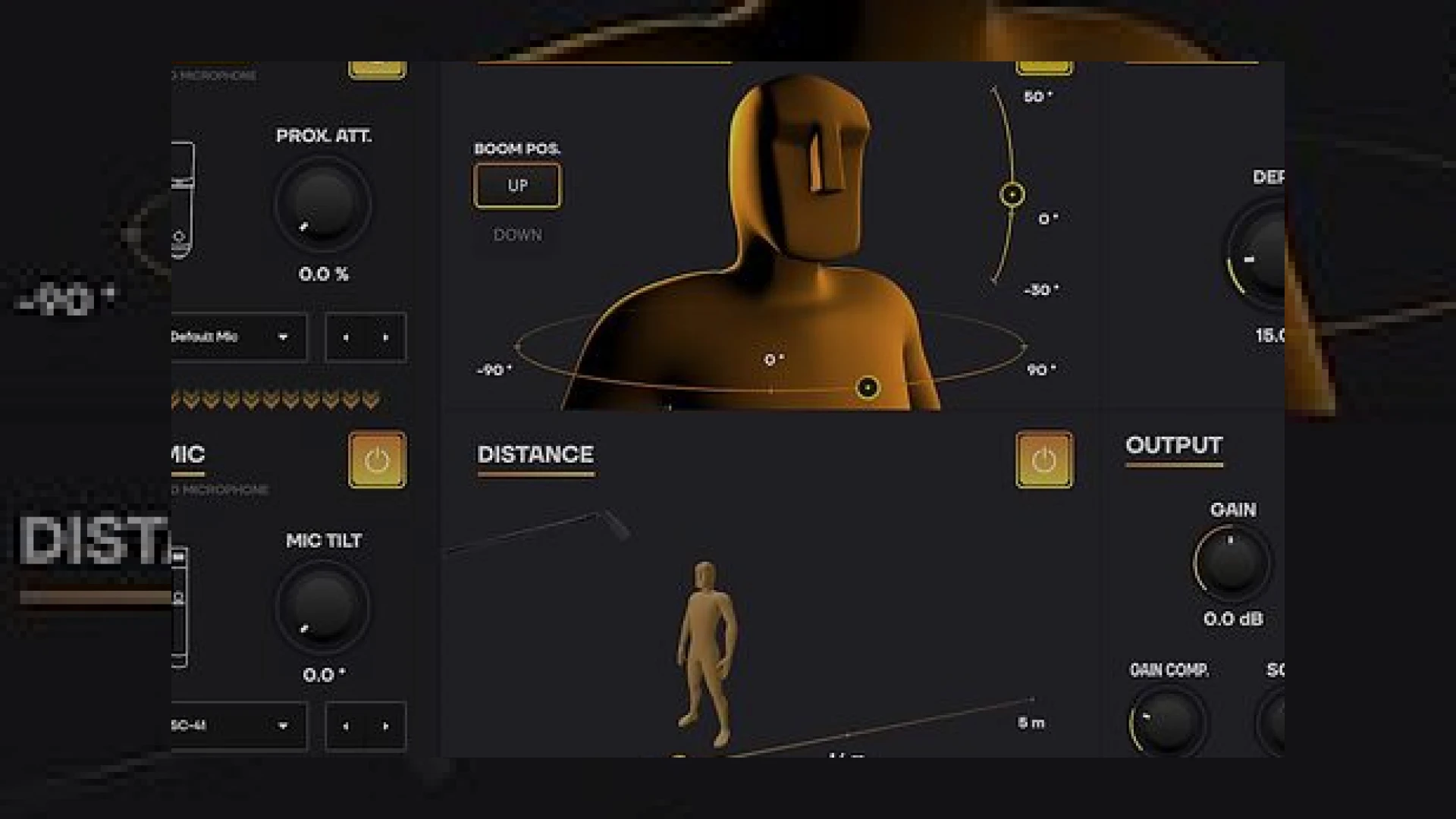
Visual context for Hal Audio unveil Boom-it.
When mixing dialogue for film, television, and multimedia, matching ADR and dubbed tracks to production audio has always been a meticulous, manual process. To address this exact post-production bottleneck, **hal audio unveil boom-it**, a revolutionary new plug-in engineered to dynamically alter the perceived position of a recorded voice, has officially hit the market. At SM Mastering, we put this processor through rigorous testing to see how it performs in a professional mixing environment.
### Why hal audio unveil boom-it Changes Dialogue Post-Production
The primary challenge in automated dialogue replacement is the static nature of studio recordings compared to dynamic on-set boom mic captures. When **hal audio unveil boom-it** enters your signal chain, it bridges this gap by recreating natural acoustic shifts caused by a performer’s body rotation, head tilt, and distance fluctuations.
Instead of relying purely on conventional EQ automation, the developers utilized advanced acoustic measurement techniques. Specifically, they deployed a Head And Torso Simulator (HATS) alongside precise measurement microphones to capture impulse responses across an array of spatial positions and body rotations. This allows mixing engineers using **hal audio unveil boom-it** to seamlessly morph between positions, matching the physical movements visible on screen.
### Advanced Workflow and Modeling Features
Beyond spatial manipulation, the processor features a comprehensive Studio Mic module. This section offers emulations of 18 industry-standard studio microphones designed to neutralize the native tone of your original recording. It also includes a Proximity Attenuation control, which is essential for taming unwanted low-end build-up if the voice was tracked too closely to the source capsule.
Once the original capture’s footprint is minimized, a secondary Set Mic module lets engineers choose from 20 modeled microphones to emulate the desired on-set aesthetic. An intuitive Angle knob further enhances the realism by simulating the complex off-axis frequency responses characteristic of directional boom microphones. For a deeper dive into professional mixing chains, check out these insights from SM Mastering Audio Articles. You can also explore industry standards like iZotope for complementary restoration tools.
### Specifications Table
| Feature | Detail |
| :— | :— |
| **Product Name** | Boom-it |
| **Primary Use** | ADR spatialization, mic emulation, and movement simulation |
| **Price** | Visit official manufacturer website for current pricing |
| **SM Mastering Rating** | 4.8 / 5 |
### Practical Studio Workflow Tips
To get the absolute best results when you **hal audio unveil boom-it** on your dialogue busses, follow these expert guidelines:
1. **Clean Up First:** Always apply spectral noise suppression and de-rustling before engaging the spatial processing module.
2. **Automate Motion Sparingly:** Use the visual 3D character head tilt and rotation interface to match major actor movements, keeping automation subtle to prevent phase artifacts.
3. **Calibrate Proximity Early:** Address the low-end proximity effect in the Studio Mic module prior to dialing in your target microphone emulation to maintain a balanced lower-midrange.
### Conclusion
Achieving seamless continuity between production dialogue and studio-recorded ADR has traditionally required extensive filtering and volume riding. The release of **hal audio unveil boom-it** provides a dedicated, acoustically accurate solution that drastically speeds up post-production workflows while elevating sonic authenticity.
### Frequently Asked Questions
**What is the main purpose of Boom-it?**
It is designed to alter the perceived position, distance, and angle of a recorded voice, helping ADR and dubbed tracks match the natural acoustic variations of on-set production audio.
**How does the plug-in simulate physical movement?**
It utilizes measured impulse responses captured via a Head And Torso Simulator (HATS) across various head positions and body rotations, allowing smooth blending within the GUI.
**Can I use it to change microphone types?**
Yes, the plug-in features a dual-module system that neutralizes the original recording’s microphone footprint and emulates over 20 popular industry-standard microphone models with adjustable off-axis angle responses.
🛒 Official Product Info & Where to Buy
Check full technical specs, pricing, and purchase options directly from the official manufacturer or authorized dealer for Hal Audio unveil Boom-it.
Written by SM Mastering
Official content on sound engineering, mixing, mastering, and advanced electronic production by SM Mastering.