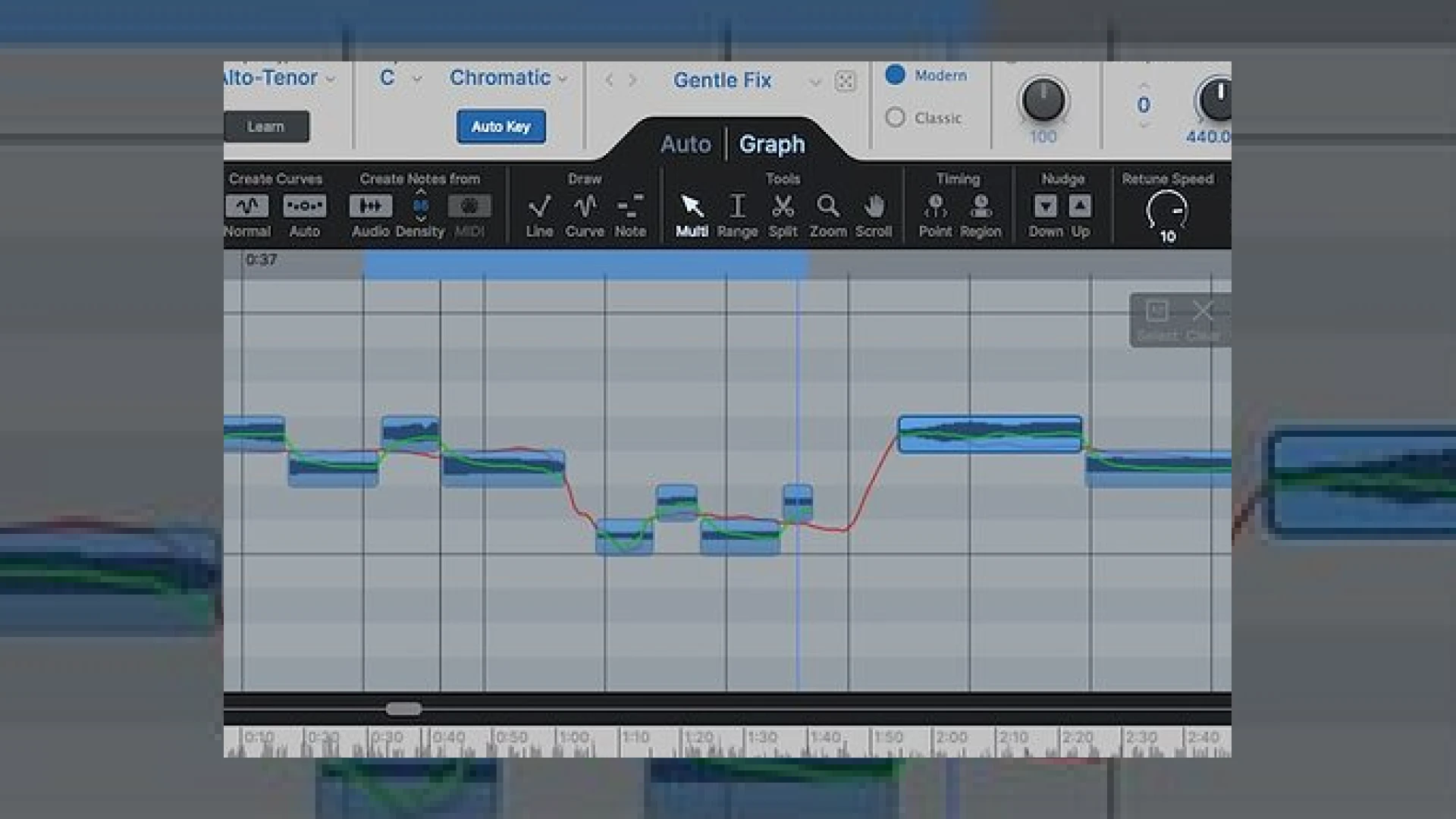
Visual context for Antares release Auto-Tune Pro X.
Professional mixing and mastering engineers are constantly looking for tools that streamline their sessions while maintaining the highest audio fidelity. When SM Mastering Audio Articles evaluates major software updates, we look closely at workflow acceleration and sonic transparency. The industry landscape shifted significantly when Antares release Auto-Tune Pro X, bringing massive under-the-hood and interface improvements to the world’s most ubiquitous pitch-correction processor.
At SM Mastering, we put this flagship processor through rigorous testing across multiple commercial mixing sessions to analyze its performance, feature set, and integration into modern digital audio workstations.
What’s New in Antares Release Auto-Tune Pro X
The latest iteration of Antares’ flagship pitch-correction suite introduces several workflow enhancements designed to tackle large-scale sessions efficiently. Most notably, the software features a completely overhauled Graph Mode that delivers smoother navigation, more responsive zooming, and heightened precision for surgical pitch and timing edits.
Furthermore, engineers working on macOS ecosystems will appreciate that antares release auto-tune pro x includes native support for Apple Silicon processors. This optimization drastically reduces CPU overhead, allowing users to run multiple instances without taxing their system resources. For those seeking alternative hardware integration strategies or hardware-accelerated processing, you might also want to explore high-end monitoring solutions like those from Neumann to ensure your monitoring environment is as accurate as your tuning decisions.
Key Features and Enhancements
Beyond the modernized user interface, several standout features define this major software update:
* **Multi-View Editing:** Engineers can now edit multiple instances of Auto-Tune from a single plugin window, drastically cutting down the time required to tune backing vocals and harmonies in dense arrangements.
* **Redesigned Graph Mode:** Offers a cleaner, more intuitive workspace for manual pitch editing, note object manipulation, and vibrato shaping.
* **Auto-Tune Unlimited Bundle:** Every purchase or upgrade includes a full year of access to the Antares subscription tier, bundling advanced tools like Auto-Tune Vocal EQ and Auto-Tune Slice.
* **Advanced Parameter Control:** Retains industry-standard parameters including Flex-Tune, Humanize, and fully adjustable Retune Speed for both transparent correction and the classic hard-tuned robotic effect.
Auto-Tune Pro X Specifications
| Feature / Metric | Specification Details |
| :— | :— |
| **Name** | Antares Auto-Tune Pro X |
| **Use** | Professional Vocal Pitch Correction & Enhancement |
| **Price** | Standard upgrade and new license options available via Antares |
| **Rating** | 4.9 / 5.0 (SM Mastering Certified) |
Practical Studio Workflow Tips
Integrating this processor into your mixing template requires a strategic approach. When managing antares release auto-tune pro x within a professional mix session, consider these practical studio workflows:
1. **Utilize Auto Mode First:** For tracking sessions or quick rough mixes, start in Auto Mode with a conservative Retune Speed to catch minor pitch deviations in real-time without introducing artifacts.
2. **Leverage Multi-View for Harmonies:** When mixing stack vocals, open the Multi-View feature to adjust the retune speeds and humanization parameters of your lead and harmony tracks simultaneously to maintain cohesive vocal glue.
3. **Reserve Graph Mode for Fine-Tuning:** Save detailed Graph Mode adjustments for the final stages of vocal production, ensuring that artificial phrasing adjustments don’t clash with the natural emotional delivery of the performance.
Conclusion
Ultimately, the excitement surrounding antares release auto-tune pro x is entirely justified. By combining native Apple Silicon compatibility, the time-saving Multi-View workflow, and a redesigned Graph Mode, Antares has successfully modernized its flagship software for today’s demanding mixing environments. Whether you need subtle, transparent pitch correction or the iconic modern pop vocal effect, this processor remains an essential asset in any professional studio.
Frequently Asked Questions
Does antares release auto-tune pro x support Apple Silicon natively?
Yes, this version features full native support for Apple Silicon processors, resulting in significantly improved CPU efficiency and performance on modern Mac computers.
Can I edit multiple vocal tracks at once in Auto-Tune Pro X?
Yes, thanks to the new Multi-View feature, you can view and edit multiple instances of Auto-Tune from a single window, making it much faster to manage complex vocal arrangements.
What is included with the purchase of Auto-Tune Pro X?
Purchasing or upgrading to this software typically includes a one-year subscription to Auto-Tune Unlimited, which grants access to a massive suite of vocal production tools, EQ modules, and specialized effects.
🛒 Official Product Info & Where to Buy
Check full technical specs, pricing, and purchase options directly from the official manufacturer or authorized dealer for Antares release Auto-Tune Pro X.
Written by SM Mastering
Official content on sound engineering, mixing, mastering, and advanced electronic production by SM Mastering.