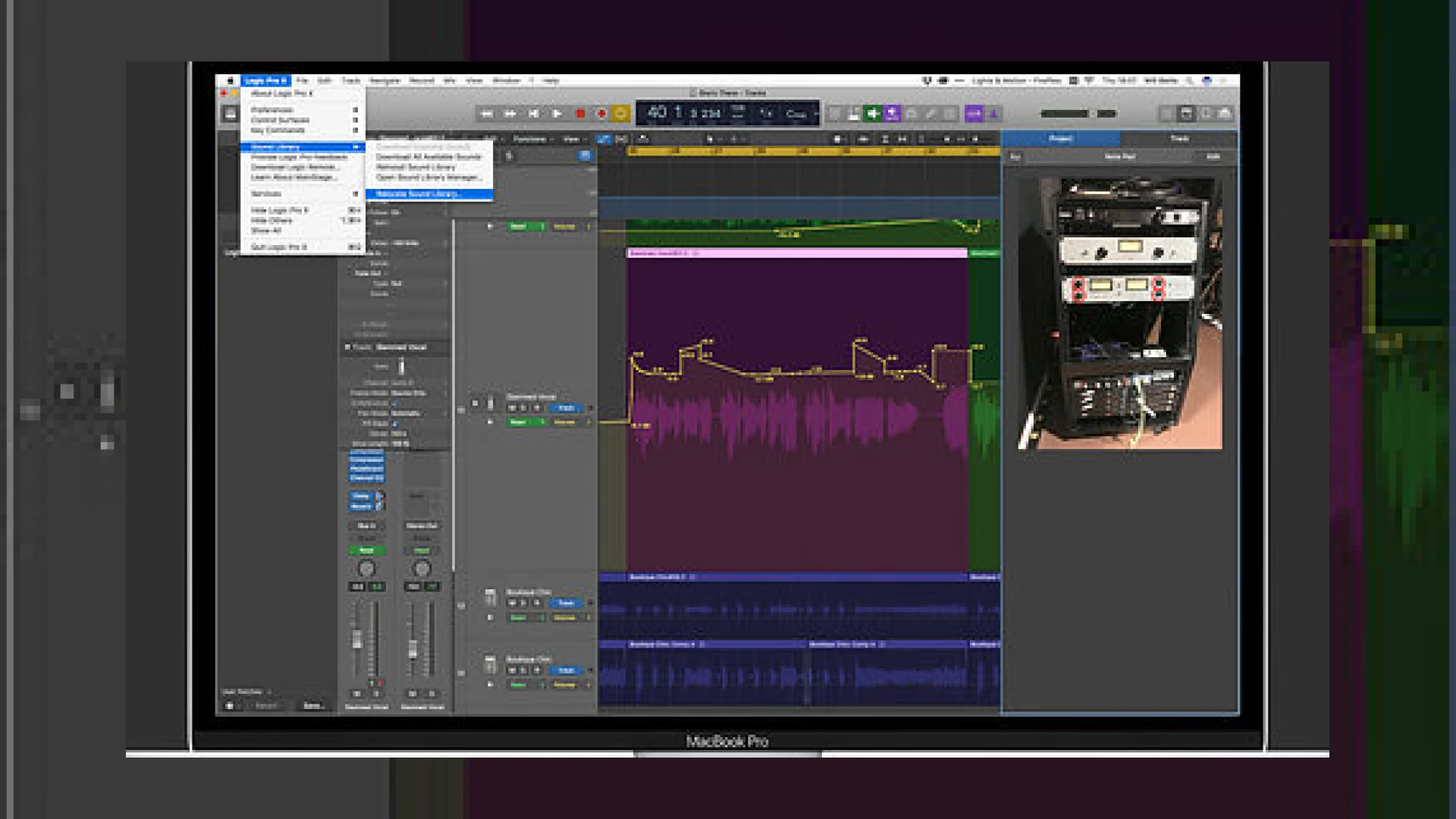
Visual context for Logic Pro 10.4.2 allows photo notes, sound libraries on ext. HDs.
As professional mastering engineers at SM Mastering, we are constantly optimizing our digital audio workstation (DAW) environments for peak performance and speed. A key update that revolutionized our workflow is Apple’s release of Logic Pro 10.4.2. Specifically, logic pro 10.4.2 allows photo notes, sound libraries on ext. hds, solving two of the most critical issues faced by modern producers and engineers: limited internal solid-state drive (SSD) storage space and the tedious task of manual analog gear recall.
For years, music producers had to rely on complex symbolic links (symlinks) or third-party workarounds to move Logic’s massive default sound libraries off their main system drives. Since Apple’s modern laptops feature fast but expensive, non-upgradeable internal SSDs, storage space is always at a premium. By understanding how logic pro 10.4.2 allows photo notes, sound libraries on ext. hds, studio owners can save hundreds of dollars on internal drive configurations. This lets you run heavy processing tools from industry leaders like iZotope without worrying about system bottlenecks caused by a clogged system disk.
Why logic pro 10.4.2 allows photo notes, sound libraries on ext. hds
The primary driver behind this update is system efficiency and hardware integration. Modern hybrid studios rely heavily on both digital precision and analog warmth. At SM Mastering, we emphasize precise recall systems, and knowing that logic pro 10.4.2 allows photo notes, sound libraries on ext. hds makes our hardware hybrid mastering workflow incredibly seamless. Engineers can now snap photos of physical outboard EQs, compressors, or summing mixers and store those visual presets directly inside the track or project notes. This eliminates the need for paper recall sheets or separate digital folders.
For more deep dives into professional audio optimization, digital studio organization, and high-end mastering tutorials, check out our curated collection of SM Mastering Audio Articles.
While the headline is that logic pro 10.4.2 allows photo notes, sound libraries on ext. hds, the update also brings smaller, quietly significant workflow enhancements. For example, dragging one automation point over another now perfectly aligns them vertically, which is incredibly useful for precise mastering transitions. Additionally, a new mixer mode lets channel strip faders control send levels directly, offering a more tactile way to manage complex routing and spatial balances.
Technical Specifications & Feature Overview
| Name | Use | Price | Rating |
|---|---|---|---|
| Sound Library Relocator | Moves Logic’s 70GB+ sound library to an external SSD with a single click. | Free (Included in Update) | 5.0 / 5.0 |
| Track & Project Photo Notes | Allows saving images of analog gear settings directly in project notes. | Free (Included in Update) | 4.8 / 5.0 |
| Sends on Faders Mode | Uses main channel faders and pans to control send auxiliary levels. | Free (Included in Update) | 4.7 / 5.0 |
| Smart Tempo Multi-Track Analysis | Analyzes and syncs tempo data across multi-track audio files. | Free (Included in Update) | 4.6 / 5.0 |
Practical Studio Workflow Tips
- Format Your External Drive Correctly: For the Sound Library relocation feature to work flawlessly, ensure your external hard drive is formatted in APFS or macOS Extended (Journaled). ExFAT and FAT32 are not officially supported for this native relocation process.
- Organize Analog Recall Folders: When taking photo notes, use high-resolution, close-up shots of your analog dials. Save them directly inside your mastering tracks to reference settings easily during subsequent revisions.
- Leverage the Automation Align Tool: Use the vertical automation point snapping feature to create instantaneous volume gates or perfect transition effects without manually aligning timestamps.
Implementing these tips under the architecture where logic pro 10.4.2 allows photo notes, sound libraries on ext. hds ensures a streamlined, clutter-free production environment that leaves more CPU cycles and storage space available for critical mastering tasks.
Conclusion
Apple’s Logic Pro 10.4.2 update is far more than a minor dot-release; it is a major quality-of-life update for both bedroom producers and high-end commercial mastering facilities. By removing storage bottlenecks and facilitating seamless analog recalls, it empowers engineers to focus on what truly matters: delivering exceptional sonic quality.
Frequently Asked Questions
1. How do I move my Logic Pro Sound Library to an external hard drive?
To move your sound library, open Logic Pro, navigate to the main menu and select Logic Pro > Sound Library > Relocate Sound Library. Choose your connected, compatible external hard drive from the list, click Relocate, and Logic will safely transfer the files and set up all internal pathways automatically.
2. What type of external hard drive is recommended for Logic Pro?
For optimal performance, especially when streaming large orchestral patches or drum libraries in real-time, we highly recommend using a Solid State Drive (SSD) connected via USB-C or Thunderbolt. Traditional mechanical hard drives (HDDs) may experience bottlenecking and slower loading times.
3. Can I store photos of any size in the track notes?
Yes, you can import standard image formats like JPEG and PNG. However, to keep your overall session file size nimble and fast-loading, it is recommended to crop and compress your outboard gear photos before dragging them into the track notes panel.

Written by SM Mastering
Official content on sound engineering, mixing, mastering, and advanced electronic production by SM Mastering.