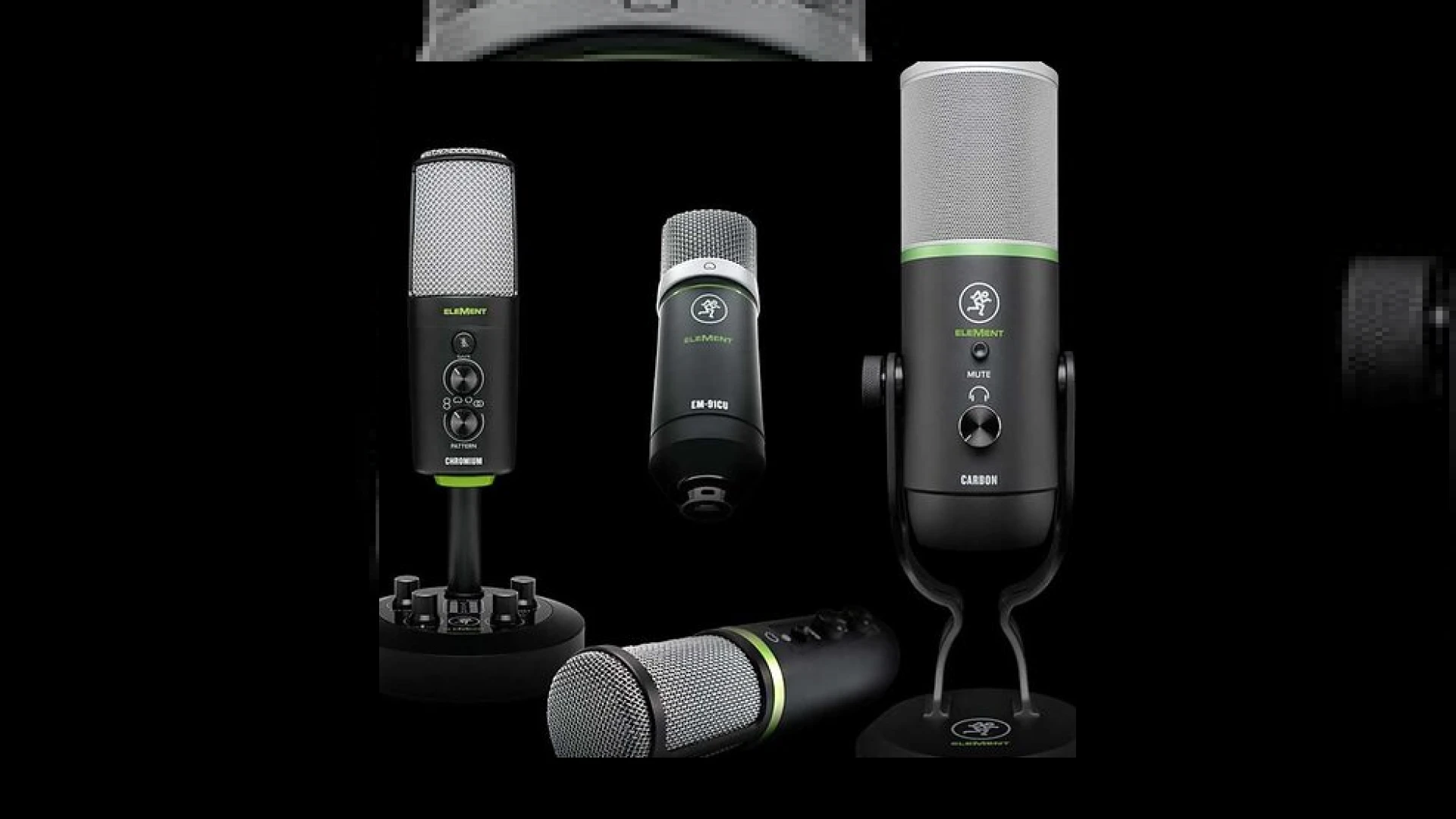
Visual context for New headphones & USB mics from Mackie.
As remote production, podcasting, and home-studio tracking continue to dominate the modern music landscape, manufacturers are racing to deliver studio-quality sound in increasingly compact, accessible formats. At SM Mastering, we are constantly evaluating the latest hardware to see how consumer-grade and prosumer-grade gear holds up under professional scrutiny. Today, we look at the new headphones & usb mics from mackie, a lineup designed to bring the company’s legendary “built-like-a-tank” philosophy and pristine Onyx preamp technology straight to your desktop USB port.
Mackie’s recent expansion into the microphone market continues with three highly affordable USB models, aimed at everyone from classroom lecturers to recording singer-songwriters. Leading the charge is the budget-friendly EM-91CU, a direct USB adaptation of their popular EM-91C condenser microphone. It offers a plug-and-play setup without the need for an external audio interface, making it an excellent starting point for basic vocal capture, virtual meetings, and drafting raw voiceovers.
Deep Dive into the new headphones & usb mics from mackie
For creators requiring more advanced features, the Carbon and Chromium models step up the game significantly. The Carbon USB microphone utilizes Mackie’s highly regarded Onyx preamp circuitry—the same technology found in their high-end VLZ-series mixers. It features four selectable polar patterns (cardioid, omni, bidirectional, and stereo), onboard gain control, a dedicated mute button, and a zero-latency headphone output. Meanwhile, the flagship Chromium model goes a step further by integrating an actual two-channel mixer into its weighted desktop stand, complete with a 1/4-inch instrument DI input and a stereo auxiliary input. This allows users to record vocals and guitar simultaneously without any extra hardware.
To complement these microphones, Mackie’s expanded closed-back monitoring headphones (such as the MC Series) provide the isolation and frequency response necessary for accurate tracking and editing. Ensuring you have high-performance headphones prevents mic bleed during sensitive recording sessions, which is crucial when prepping tracks for professional post-production. When integrating the new headphones & usb mics from mackie into your daily tracking routine, pairing them with professional-grade digital audio workstations like Ableton will streamline your workflow and yield impressive results.
For more detailed guides on setting up your monitoring environment or preparing your mixes for our analog mastering chain, feel free to explore our library of SM Mastering Audio Articles.
Specifications & Overview
| Name | Use | Price | Rating |
|---|---|---|---|
| EM-91CU USB Condenser | Podcasting, Live Streaming, Remote Learning | $49.99 | 4.0 / 5.0 |
| Carbon Premium USB Mic | Vocal Recording, Multi-pattern Podcasting | $149.99 | 4.5 / 5.0 |
| Chromium Premium USB Mic | Singer-Songwriters, Multi-input Recording | $199.99 | 4.7 / 5.0 |
| DB-100 Desktop Boom Arm | Flexible Studio Microphone Placement | $79.99 | 4.2 / 5.0 |
| PF-100 Pop Filter | Vocal Plosive Protection | $14.99 | 4.4 / 5.0 |
Practical Studio Workflow Tips
To get the absolute best performance from the new headphones & usb mics from mackie, consider implementing these expert-level engineering practices in your project studio:
- Manage Your Gain Stages: When using the Carbon or Chromium, set the microphone’s hardware gain control so that your DAW meters peak around -12 dBFS to -18 dBFS. This leaves healthy headroom for dynamic vocal performances and subsequent digital processing.
- Optimize the Polar Pattern: Utilize the bidirectional (figure-8) pattern on the Carbon for face-to-face interviews, or switch to the stereo pattern when recording acoustic guitars to capture natural spatial depth.
- Mitigate Room Reflections: USB microphones are highly sensitive. Position your setup away from hard surfaces (like computer screens or bare walls) and use the PF-100 pop filter to eliminate harsh plosive sounds.
Conclusion
In conclusion, the new headphones & usb mics from mackie bridge the gap between consumer convenience and professional utility. While a dedicated XLR setup with boutique preamps remains the gold standard at SM Mastering, these USB tools provide a highly efficient, cost-effective, and remarkably clean signal path for voice talent, content creators, and musicians on the go.
Frequently Asked Questions
Can I use the Mackie USB microphones for professional music production?
Yes, models like the Carbon and Chromium feature professional-grade Onyx preamps and high-resolution digital converters. While they are highly convenient USB devices, they deliver clean, low-noise recordings suitable for professional vocal overdubs, demo tracking, and podcast production.
Do these microphones require additional drivers to work?
No, the Element Series USB microphones from Mackie are class-compliant. They are plug-and-play on both macOS and Windows systems, requiring no external drivers or complicated software installation to begin recording.
What is the benefit of the built-in mixer on the Chromium model?
The Chromium’s built-in 2-channel mixer allows you to plug an instrument directly into a 1/4″ input and mix it in real-time with your vocal signal and an auxiliary backing track. This makes it an all-in-one hub for singer-songwriters, bypassing the need for an external audio interface.
🛒 Official Product Info & Where to Buy
Check full technical specs, pricing, and purchase options directly from the official manufacturer or authorized dealer for New headphones & USB mics from Mackie.

Written by SM Mastering
Official content on sound engineering, mixing, mastering, and advanced electronic production by SM Mastering.