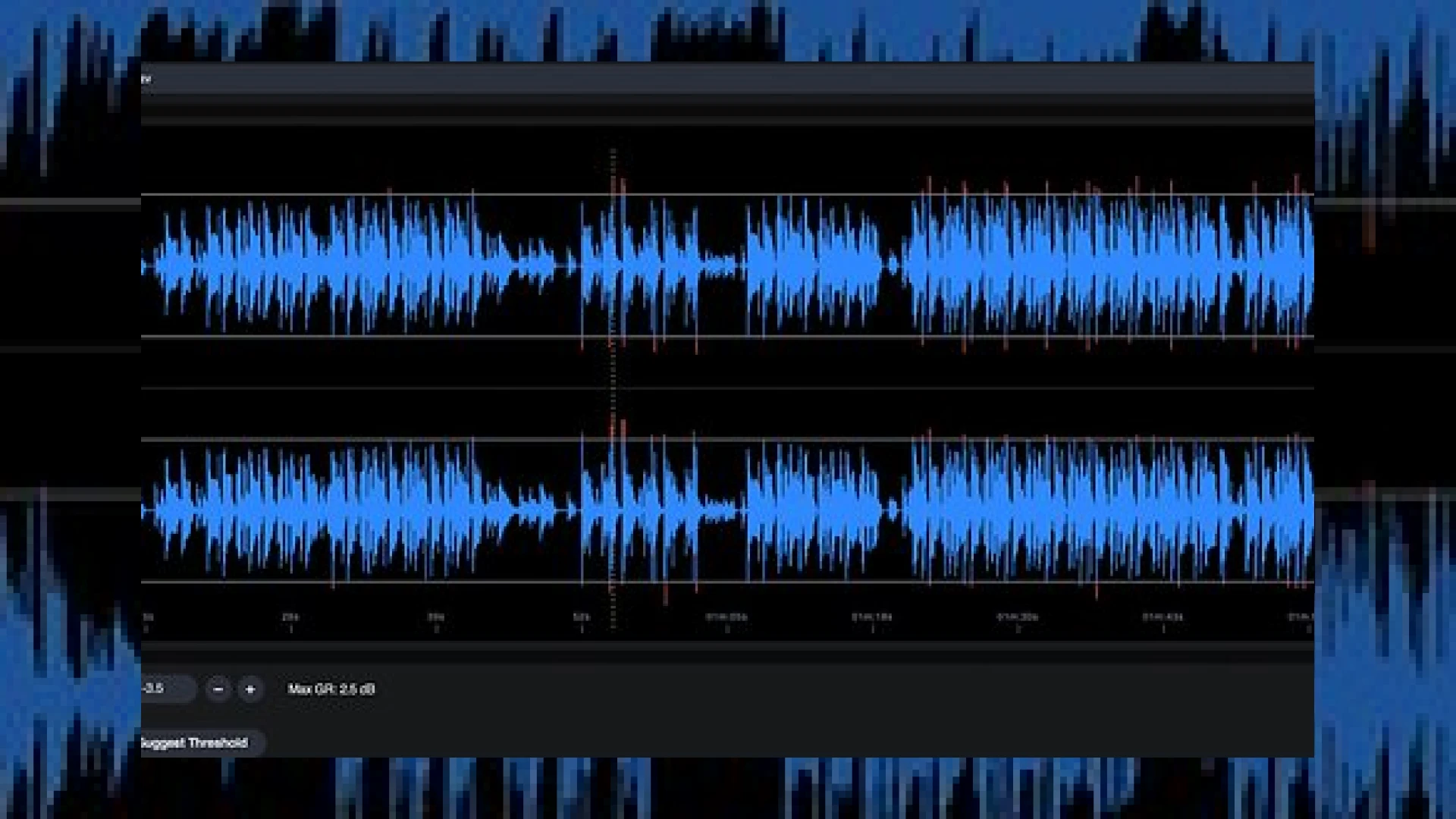
Visual context for Peak Tamer from Nicky Howard.
In modern mastering, managing transient peaks without introducing unwanted artifacts like distortion, pumping, or loss of clarity is an ongoing challenge. While traditional limiters and clippers are standard tools in any engineer’s toolkit, they often impart a sonic signature that can alter the delicate balance of a mix. In this technical deep-dive, we analyze the capabilities of Peak Tamer from Nicky Howard, a groundbreaking standalone application designed to bridge the gap between tedious manual gain automation and aggressive dynamic processing.
For decades, mastering engineers have relied on hand-drawn volume automation to tame rogue peaks before feeding audio into analog hardware or precision digital limiters. This transparent technique preserves the natural punch of a track, but it is incredibly time-consuming. This is where Peak Tamer from Nicky Howard excels, offering a sophisticated, automated approach that replicates manual gain riding with surgical precision, unmatched speed, and absolute recall reliability.
How Peak Tamer from Nicky Howard Revolutionizes Dynamics Control
One of the standout design choices in Peak Tamer from Nicky Howard is its dedicated standalone architecture. Unlike standard plugins that run inside a DAW, this software acts as a dedicated pre-processing environment. While classic tools from hardware giants like Universal Audio excel at vintage compression and warm saturation, Peak Tamer focuses entirely on clean, artifact-free gain attenuation. It identifies transient anomalies across the entire timeline and applies smooth, automated volume adjustments before any heavy-handed dynamic processors are engaged down the signal chain.
The interface is built around a highly intuitive waveform display that allows engineers to visualize and zoom in on specific problem areas. A highly accurate Threshold parameter lets you set the exact point where peak attenuation begins. Adjustments can be made in precise 0.1dB steps, offering mastering-grade resolution. Crucially, the software includes a “Suggested Threshold” feature that analyzes the entire file to provide an optimized starting point within seconds. Engineers can also link or unlink the left and right channels; linking ensures that identical gain reduction is applied to both sides to preserve the original stereo image, while unlinking allows for highly independent dual-mono corrections.
Specifications & Overview
To help you understand where this software fits in your technical toolkit, here is a breakdown of its core specifications:
| Specification | Details |
|---|---|
| Product Name | Peak Tamer |
| Developer | Nicky Howard |
| Application Type | Standalone Utility / Automatic Gain Automation |
| Key Features | Suggested Threshold Analysis, 0.1dB precision control, Linked/Unlinked Stereo processing, Visual Waveform Zoom |
| Price | £49 / $59 (Approximate introductory price) |
| SM Mastering Rating | 4.8 / 5 Stars |
Practical Studio Workflow Tips
Integrating Peak Tamer from Nicky Howard into your daily studio routine can dramatically speed up your mastering preparation. Here is how our engineering team recommends using it:
- Pre-Conditioning Files: Always run your raw pre-masters through the software before applying any analog compression or digital limiting. By eliminating rogue transients beforehand, your downstream limiters will not have to work as hard, resulting in a cleaner, louder, and more open master.
- Utilize the Suggested Threshold: Let the software analyze the track first. Use the suggested threshold as a baseline, then manually tweak it by 0.2dB to 0.5dB to find the perfect sweet spot between natural dynamics and controlled peaks.
- Stereo Image Protection: For acoustic, classical, or jazz projects, keep the channels linked to maintain a stable, coherent stereo image. For modern electronic music or heavily panned pop tracks, try unlinking the channels to address independent transient spikes on the far left or right.
Conclusion
Ultimately, managing transients is the secret to achieving competitive loudness without sacrificing the emotional impact of a mix. We highly recommend incorporating Peak Tamer from Nicky Howard into your pre-mastering stages. It successfully combines the sonic purity of manual fader riding with the speed of modern automation. For more expert advice, software reviews, and deep-dives into high-end production techniques, be sure to explore our repository of SM Mastering Audio Articles.
Frequently Asked Questions
Is Peak Tamer a VST/AU plugin?
No, Peak Tamer is a standalone application. It is designed to process audio files prior to importing them into your DAW of choice for final mastering or mix bus processing.
How does Peak Tamer protect the stereo image of a mix?
The software features a linkable channel control. When linked, any peak reduction applied to a transient on one side is identically mirrored on the other, maintaining absolute spatial balance across the stereo field.
Can I manually override the automated suggestions?
Yes. While the built-in analyzer provides a highly accurate “Suggested Threshold,” users have full manual control to adjust parameters in highly precise 0.1dB increments for customized results.
🛒 Official Product Info & Where to Buy
Check full technical specs, pricing, and purchase options directly from the official manufacturer or authorized dealer for Peak Tamer from Nicky Howard.

Written by SM Mastering
Official content on sound engineering, mixing, mastering, and advanced electronic production by SM Mastering.