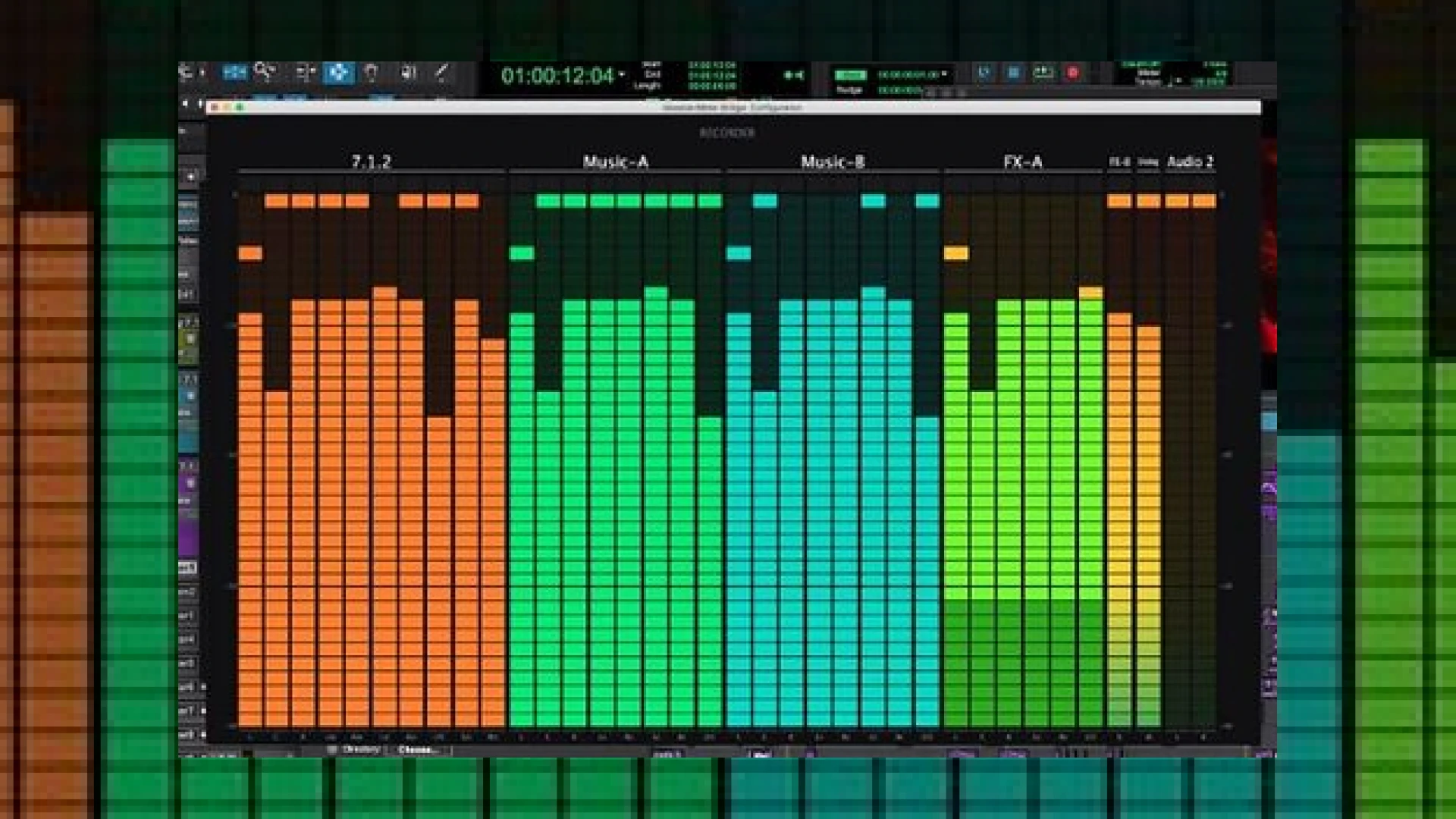
Visual context for Post Production Metering Suite for Pro Tools.
Here at SM Mastering, precision, translation accuracy, and industry compliance dictate every mix and master that leaves our studio. When tackling complex film, television, and streaming deliverables, having a reliable visual reference is just as critical as high-end monitoring. For engineers working within Avid’s ecosystem, choosing the right **post production metering suite for pro tools** can mean the difference between passing stringent broadcast loudness compliance on the first try or facing costly revisions.
Evergreen Audio Design Group has introduced a powerful software package designed to solve visual workflow bottlenecks in large-scale mixing environments. Comprising the Massive Meter AAX plug-in and the Massive Meter Bridge desktop application, this system allows engineers to view multiple meters from their Pro Tools sessions in a single, customizable view. Whether you are mixing dialogue, sound effects, or expansive immersive audio beds, integrating a dedicated **post production metering suite for pro tools** ensures absolute control over your dynamic range and true-peak levels without cluttering your screen real estate.
## Understanding the Architecture of Massive Meter
The core of the system relies on the Massive Meter plug-in, which offers both Peak and RMS meter modes. Users can configure these indicators to display as either smooth gradients or discrete segments depending on visual preference. Furthermore, each meter supports independent color coding, and scaling can be customized to zero in on critical dynamic ranges.
When configuring a **post production metering suite for pro tools**, session templates play an integral role in accelerating turnaround times. Templates can be generated to mirror your Pro Tools track layouts, allowing custom configurations to load automatically for specific film or episodic projects. For further insights on optimizing your digital audio workstation, check out our resources at SM Mastering Audio Articles.
## Expanding Your Visual Workflow with Massive Meter Bridge
One of the standout features of this toolkit is the Massive Meter Bridge desktop application, which is capable of aggregating multiple Massive Meter plug-ins—even if those instances are hosted on separate network computers. Because no proprietary hardware is required, facilities can drastically reduce the setup costs and hardware routing complications typically associated with multi-screen physical meter bridges.
Additionally, the plug-in architecture allows a single session to connect to multiple desktop application instances. This flexibility lets large post-production facilities configure unique, custom metering views tailored to each individual mix engineer’s workflow. For hardware compatibility and industry updates regarding high-end studio monitoring, you can also reference industry leaders like Avid Pro Tools.
## Specifications Table
| Feature / Metric | Specification Details |
| :— | :— |
| **Name** | Post Production Metering Suite for Pro Tools |
| **Use** | Advanced multi-channel metering, loudness compliance, and visual workspace management |
| **Price** | Standard software license tier (includes iLok support) |
| **Rating** | 4.8 / 5 |
## Practical Studio Workflow Tips for Metering
To maximize the efficiency of your **post production metering suite for pro tools**, follow these expert studio practices:
* **Template Integration:** Always link your metering layouts directly to your Pro Tools session templates so that dialogue, music, and effects buses route to your preferred meter bridges instantly.
* **Color Coding:** Assign distinct colors to dialogue stems, Foley, hard effects, and backgrounds to instantly identify source types from across the control room.
* **Range Customization:** Narrow your meter scaling during dialogue mixing to focus heavily on the -20 dB to -10 dB sweet spot, enhancing visual sensitivity where human speech resides.
## Conclusion
Navigating the strict loudness regulations of modern broadcast and streaming platforms requires uncompromised visual accuracy. By combining flexible AAX plug-ins with a network-capable desktop bridge application, modern facilities can streamline their visual workflows significantly. Utilizing a robust **post production metering suite for pro tools** eliminates guesswork, safeguards against clipping, and ultimately guarantees translation across all consumer playback devices.
## Frequently Asked Questions
### What formats does the metering plug-in support?
The Massive Meter plug-in can be instantiated on tracks of any channel format, ranging from simple mono channels to complex multi-channel immersive formats, with no artificial limit on the number of simultaneous instances.
### Does the suite require external hardware?
No. The entire system operates purely via software, removing the high financial costs and complex routing hardware traditionally required to build multi-screen metering bridges.
### Can the desktop application run on a separate computer?
Yes. The Massive Meter Bridge desktop application is capable of displaying multiple Massive Meter plug-in feeds even if those plug-ins are hosted on entirely separate computers across a network.
🛒 Official Product Info & Where to Buy
Check full technical specs, pricing, and purchase options directly from the official manufacturer or authorized dealer for Post Production Metering Suite for Pro Tools.
Written by SM Mastering
Official content on sound engineering, mixing, mastering, and advanced electronic production by SM Mastering.