If you are looking for a professional Serum VST Windows solution for music production, sound design and modern electronic music, Serum 2 from Xfer Records is one of the most comprehensive synthesizers available today.
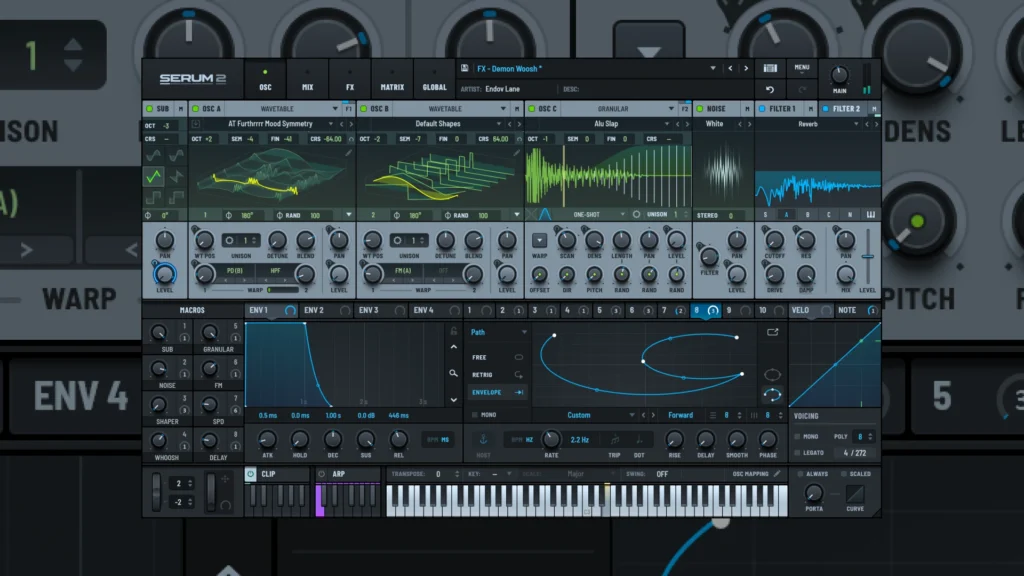
Originally known for its powerful wavetable synthesis engine, Serum has become an important instrument for producers who need detailed control over their sounds. With the release of Serum 2, Xfer Records expanded the original concept with additional synthesis technologies, including sample, multisample, granular and spectral oscillators.
Serum 2 is available for both Windows and macOS and supports 64-bit VST3, AU and AAX plugin formats. On Windows, VST3 is the primary format used by modern digital audio workstations and provides seamless integration with compatible music production software.
In this guide, we will take a detailed look at Serum 2 for Windows, including compatibility, installation, plugin formats, oscillators, modulation, presets, updates, CPU performance and its applications in professional music production.
What Is Serum VST Windows?
The term Serum VST Windows generally refers to the Windows version of the Serum software synthesizer developed by Xfer Records.
Serum is designed to operate inside a compatible digital audio workstation, or DAW, rather than functioning only as a traditional standalone instrument. This allows producers to integrate the synthesizer directly into their production workflow.
Once installed, Serum 2 can be used to create a wide range of sounds, including:
Bass sounds
Leads
Plucks
Pads
Keys
Arpeggios
Atmospheric textures
Sound effects
Risers
Experimental sounds
Synthesized instruments
One of the most important characteristics of Serum is its visual approach to synthesis. Instead of relying exclusively on traditional controls, the interface allows producers to see waveforms, modulation, envelopes and other elements of the sound-generation process.
This makes Serum particularly useful for producers who want to understand and control the relationship between synthesis parameters and the resulting sound.
Serum 2 Windows Compatibility
For producers searching for Serum for Windows, compatibility is one of the first things to check before installing the plugin.
According to Xfer Records, Serum 2 requires Windows 10 or later and a compatible 64-bit host application. The synthesizer is available in VST3, AU and AAX 64-bit formats.
The official requirements include:
Windows 10 or later
64-bit operating system
64-bit compatible DAW
VST3 or AAX compatible host on Windows
This means that Serum 2 is designed for modern Windows-based music production systems.
It is also important to keep the operating system, DAW, audio drivers and plugin versions updated when building a professional production environment. Compatibility problems are often related not to the synthesizer itself but to outdated hosts, drivers or plugin-management configurations.
Does Serum 2 work on macOS?
Yes. Although this article focuses on Serum VST Windows, Serum 2 is also available for macOS.
Xfer Records lists support for macOS High Sierra or later on Intel-based Macs and Big Sur or later on Apple Silicon systems.
Therefore, Serum 2 is a cross-platform synthesizer rather than a Windows-exclusive instrument.
Serum VST3: Plugin Format Explained
One of the most important aspects of installing Serum on Windows is understanding the plugin format.
Serum 2 is available as a 64-bit VST3 plugin, which is the format most Windows users will work with when using modern DAWs.
VST3 allows the synthesizer to integrate with compatible music-production applications and appear inside the DAW’s instrument or plugin browser.
Xfer Records officially states that Serum is designed to be used inside a host application supporting VST3, AU or AAX formats.
For Windows users, VST3 is the most relevant format.
If you install Serum 2 and your DAW does not immediately display it, the first step is usually to refresh or rescan the plugin database.
Xfer Records specifically recommends opening the DAW and rescanning or refreshing its plugins after installation.
How to Install Serum VST Windows
Installing Serum 2 on Windows is a straightforward process when using the official installer.
After downloading the installer from your Xfer Records account, run the installation file and follow the instructions provided by the installer.
Once the installation has been completed, open your DAW and rescan the available plugins.
The general process is:
Download the official Serum 2 installer.
Run the Windows installer.
Complete the installation process.
Open your DAW.
Rescan or refresh the plugin database.
Locate Serum 2 in your instrument/plugin browser.
Load Serum 2 onto an instrument track.
Load a preset and test the synthesizer.
Xfer Records provides specific installation documentation for Windows and macOS and recommends rescanning the plugins after installation.
If the plugin is not detected, check the plugin locations configured in your DAW before reinstalling the software.
Serum 2: The Evolution of a Popular Wavetable Synthesizer
The original Serum became widely recognized for its wavetable synthesis engine and detailed visual interface.
Serum 2 retains this fundamental concept while expanding the instrument into a broader hybrid synthesis platform.
Instead of relying exclusively on wavetable synthesis, Serum 2 provides several different oscillator technologies that can be combined to create more complex sounds.
This makes the new version suitable for both traditional synthesizer programming and more experimental sound design.
The result is a synthesizer that can move between conventional electronic sounds and much more complex audio manipulation.
Wavetable Oscillator
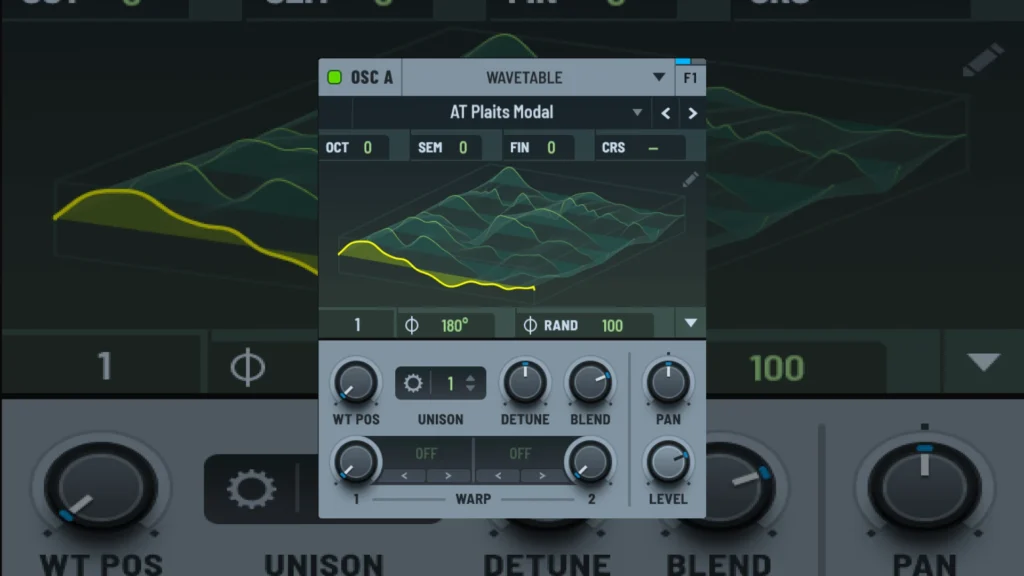
Wavetable synthesis remains one of the defining features of Serum.
A wavetable contains a series of waveforms that can be scanned and manipulated to create movement within a sound.
Rather than using a single static waveform, the oscillator can move through different waveform positions, creating evolving harmonic content.
This makes wavetable synthesis particularly useful for modern electronic music.
Serum can be used to create:
Moving basses
Evolving leads
Digital plucks
Complex pads
Aggressive synth sounds
Metallic textures
Modern electronic effects
The ability to modulate wavetable position also means that the sound can evolve during a note rather than remaining static.
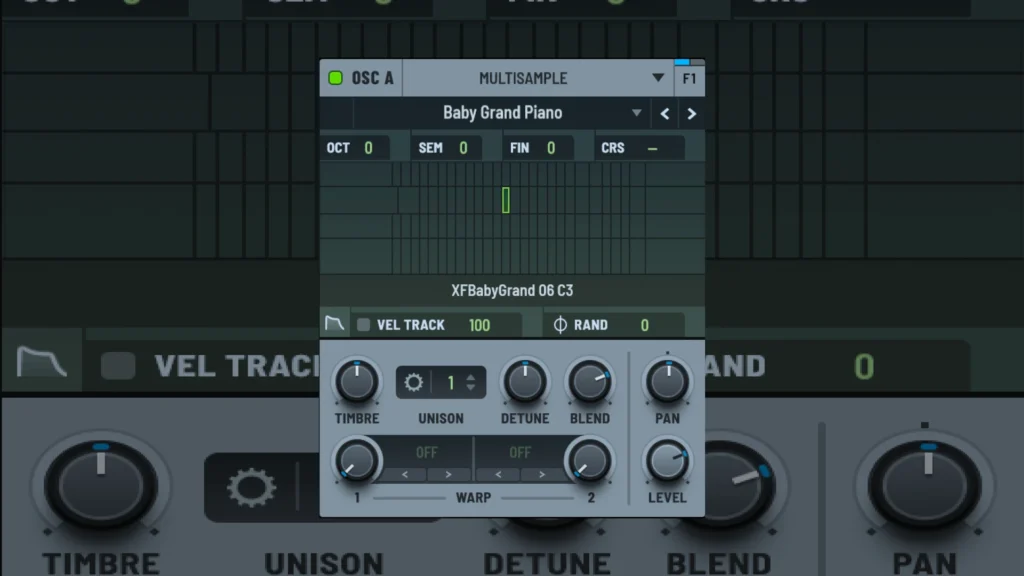
Multisample Oscillator
One of the major additions introduced with Serum 2 is the Multisample Oscillator.
This expands the instrument beyond conventional synthesis by allowing producers to work with multisampled instruments.
Xfer Records describes Serum 2 as including a collection of recorded instruments from different parts of the world, including orchestral instruments, choirs, pianos and guitars. The system also supports SFZ files.
This creates interesting possibilities for hybrid sound design.
A producer can combine acoustic source material with synthesized oscillators, filters and modulation to create sounds that are neither purely acoustic nor purely electronic.
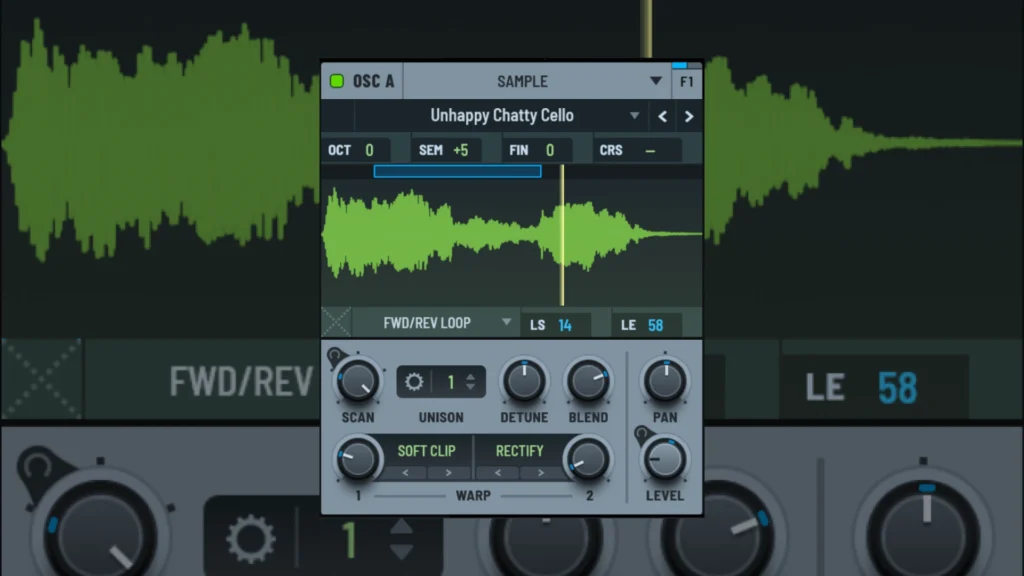
Sample Oscillator
The Sample Oscillator provides another way to work with recorded audio.
Although its basic purpose is sample playback, Xfer Records has expanded it with several sound-design features, including looping, loop detection, loop modulation, rate control, tape-stop effects, slicing, FM, phase distortion and distortion.
This means that a sample does not have to remain recognizable in its original form.
A producer can take a recording and manipulate it until it becomes a completely different sonic element.
This is particularly useful for creating transitions, textures, rhythmic sounds and experimental instruments.
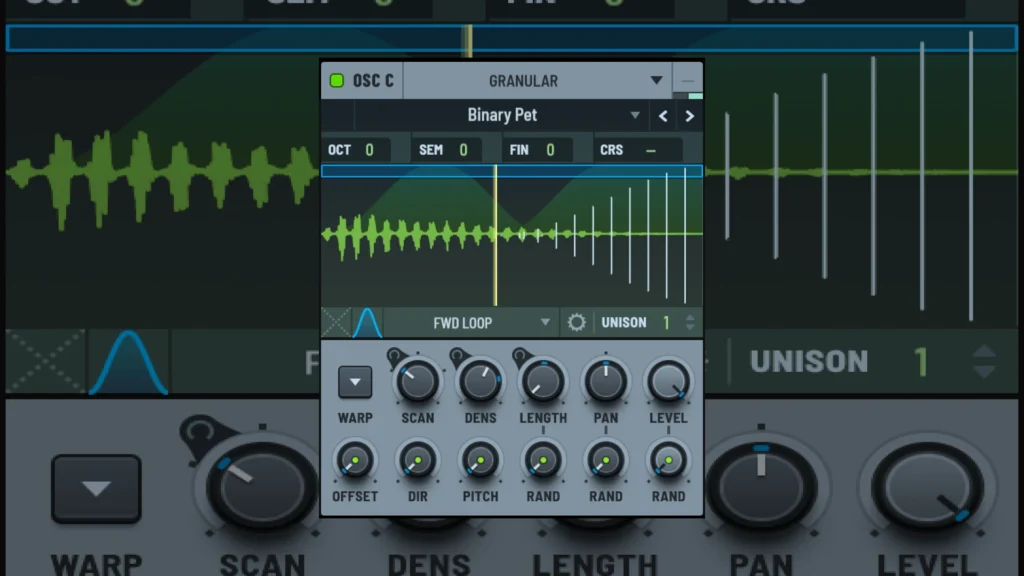
Granular Oscillator
The Granular Oscillator adds another layer of sound manipulation.
Granular synthesis works by dividing audio into very small segments and manipulating those fragments independently.
This can produce unusual textures, atmospheric sounds and constantly changing sonic landscapes.
For electronic music producers and sound designers, granular synthesis provides a useful alternative when traditional subtractive or wavetable synthesis does not produce the desired result.
The ability to combine granular processing with Serum’s other synthesis tools makes Serum 2 particularly flexible for experimental sound design.
Spectral Oscillator
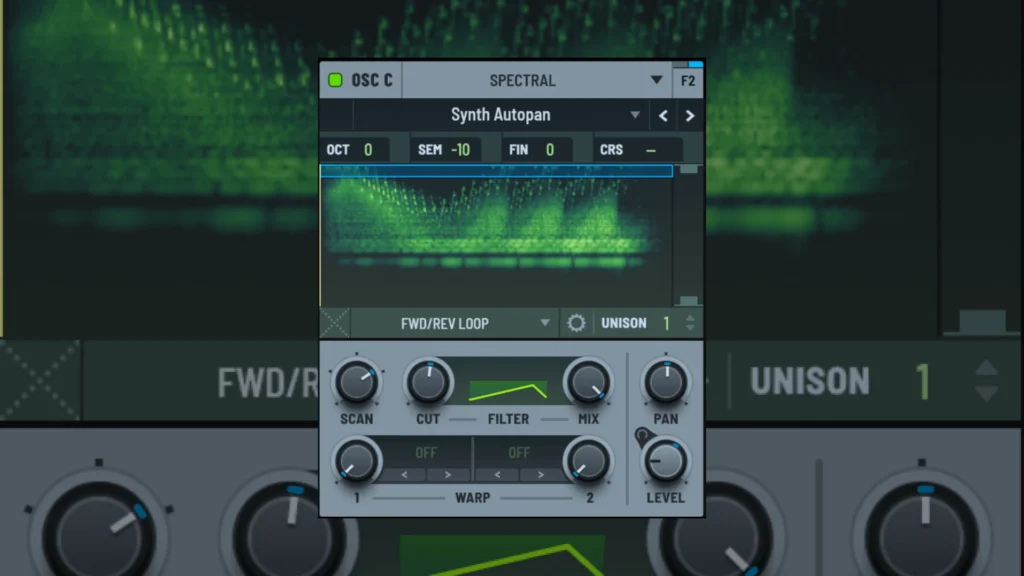
The Spectral Oscillator takes Serum 2 even further into advanced sound manipulation.
Xfer Records describes it as a tool for real-time resynthesis at the harmonic level, combined with transient detection processing that can reshape time and frequency characteristics.
This opens up possibilities for transforming samples and creating complex harmonic textures.
For producers interested in sound design rather than simply preset playback, spectral processing can become an important part of the Serum 2 workflow.
Modulation and Sound Design
A synthesizer’s real power often comes from its modulation system.
Oscillators provide the raw material, but modulation determines how that material changes over time.
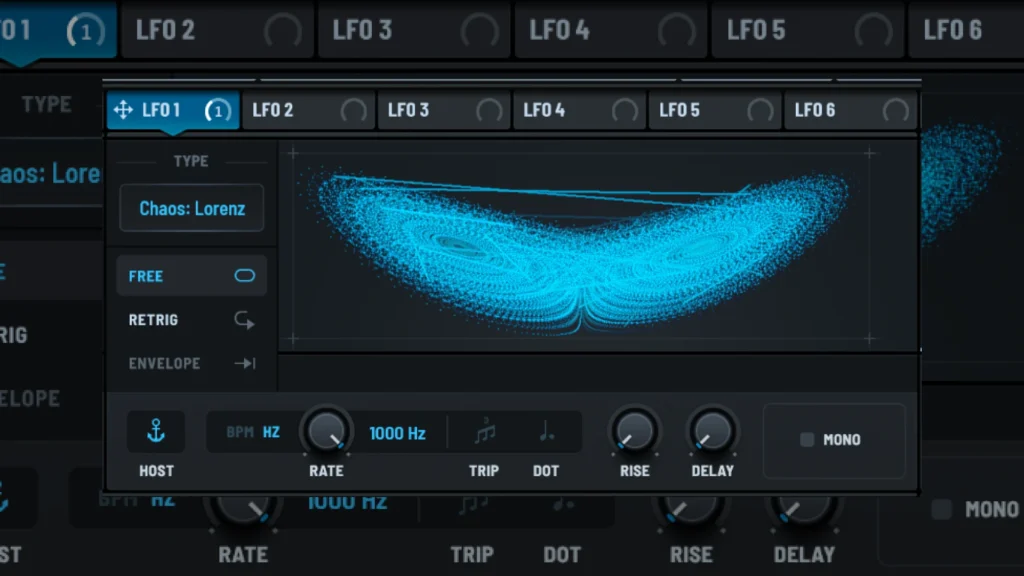
Serum 2 allows producers to create dynamic relationships between different synthesis parameters, making it possible to build sounds that evolve continuously.
Modulation can be used for:
Wavetable movement
Filter changes
Pitch variation
Amplitude changes
Stereo movement
Effects modulation
Rhythmic patterns
Evolving textures
For example, a slow modulation source can gradually move a wavetable through its harmonic content while simultaneously opening a filter.
The result can be a sound that changes naturally throughout the duration of a note.
This approach is particularly useful for pads, evolving leads, atmospheric sounds and modern electronic textures.
Effects and Internal Processing
Serum 2 also includes an extensive internal effects architecture.
Having effects inside the synthesizer is useful because the producer can shape a patch before it reaches the main processing chain of the DAW.
Depending on the sound being created, internal processing can be used to add character, width, movement and depth.
This does not mean external processing becomes unnecessary.
Professional productions often use both internal synthesizer processing and external plugins.
The advantage of Serum is that a significant amount of sound shaping can be completed directly inside the instrument.
Serum 2 Presets and Wavetables
Factory content is another important part of the Serum 2 experience.
According to the official Xfer Records product page, Serum 2 includes more than 626 presets and 288 wavetables.
These presets can be used immediately or treated as starting points for sound design.
For producers learning synthesis, presets are particularly useful as examples.
Instead of simply using a preset, it can be helpful to inspect how it was constructed.
Look at the:
Oscillator configuration
Wavetable selection
Filter settings
Envelopes
LFOs
Modulation assignments
Effects
Routing
This turns presets into practical examples of synthesis programming.
Serum 2 Updates and Long-Term Support
Software support is an important consideration when purchasing a professional virtual instrument.
Xfer Records lists Lifetime Free Updates for Serum 2, providing users with ongoing access to updates without requiring them to purchase every new version separately.
The company also states that Serum 2 is a free upgrade for existing Serum 1 owners.
Xfer Records has continued to provide documentation and technical support for Serum users, including installation, upgrades, plugin detection and other technical issues.
Serum 1 and Serum 2
Users who already own Serum 1 can continue using it after upgrading.
Xfer Records states that both versions can be installed simultaneously, although the company recommends migrating to Serum 2. The company also notes that Serum 1 has reached end-of-life, meaning new fixes and features are not expected to be added to the original version.
This is useful for producers who have older projects that still rely on the original Serum.
Serum 2 can therefore be introduced into a production environment without necessarily removing the previous version.
Serum 2 CPU Performance
CPU performance is an important consideration when working with modern software synthesizers.
According to Xfer Records, Serum 2 is optimized to use the same amount of CPU or less than Serum 1 for equivalent patches. However, some of the new features introduced in Serum 2 can require additional processing power.
Actual CPU usage depends on several factors, including:
Number of Serum instances
Preset complexity
Oscillator types
Unison settings
Effects
Sample rate
Buffer size
DAW configuration
Computer hardware
A large project with many synthesizers can naturally place greater demands on the computer.
Modern DAWs provide tools such as track freezing, rendering and bouncing that can help manage CPU usage when a project becomes more demanding.
Serum 2 for Electronic Music Production
Serum has become particularly popular among electronic music producers because of its flexibility.
It can cover a large range of roles within a production.
Bass
Serum can produce everything from clean sub basses to aggressive, heavily modulated bass sounds.
The wavetable system is particularly useful for creating movement and harmonic complexity in bass patches.
Leads
Lead sounds can benefit from Serum’s combination of wavetable synthesis, modulation, filters and unison.
This allows producers to create anything from simple melodic leads to wide and complex layered sounds.
Plucks
Fast envelopes and carefully designed filters make Serum particularly effective for plucked sounds.
These sounds can work well in melodic electronic music, progressive styles and rhythmic arrangements.
Pads
Slow modulation and evolving wavetable movement can create wide atmospheric pads.
Combining these sounds with reverb and delay can produce large spatial textures.
Effects and Transitions
Serum can also be used as a dedicated sound-design tool for creating:
Risers
Downlifters
Impacts
Sweeps
Noise effects
Transitions
Experimental FX
This makes it useful not only for melodic instruments but also for arrangement and production effects.
Is Serum 2 Worth It for Windows Users?
For producers looking for a flexible modern synthesizer, Serum 2 for Windows is a strong option.
Its biggest advantage is not simply the number of presets or the popularity of the Serum brand.
The real advantage is the depth of its synthesis architecture.
The combination of wavetable, sample, multisample, granular and spectral synthesis gives producers multiple approaches to sound creation inside one instrument.
This makes Serum 2 useful for both beginners learning synthesis and experienced producers building detailed custom patches.
However, the most important factor is how the instrument is used.
A large preset library can be useful, but understanding synthesis provides much more long-term value.
Learning how oscillators, filters, envelopes, modulation and effects interact allows the producer to create sounds specifically for a production rather than simply searching through presets.
Where to Get Serum 2 for Windows
Serum 2 is available directly from Xfer Records, the company responsible for developing the synthesizer.
The official product page contains information about the current version, pricing, system requirements, available formats and the official Windows and macOS downloads.
Xfer Records also provides an official demo version for Windows and macOS. According to the company’s product page, the demo is limited to 15 minutes.
For security, compatibility and access to official updates, using the software obtained directly from Xfer Records is the safest approach.
Frequently Asked Questions
Does Serum 2 work on Windows?
Yes. Serum 2 supports Windows 10 or later and requires a compatible 64-bit host application.
Is Serum 2 available as VST3?
Yes. Serum 2 is available as a 64-bit VST3 plugin, as well as AU and AAX formats.
Does Serum 2 work on macOS?
Yes. Xfer Records provides versions for supported Intel and Apple Silicon Macs.
Do I need Serum 1 to use Serum 2?
No. Serum 2 is available as its own product. Existing Serum 1 owners can upgrade to Serum 2 without purchasing the new version separately.
Can Serum 1 and Serum 2 be installed together?
Yes. Xfer Records states that both versions can be installed simultaneously.
How many presets are included with Serum 2?
The official product page lists more than 626 presets and 288 wavetables.
Does Serum 2 receive free updates?
Yes. Xfer Records lists Lifetime Free Updates for Serum 2.
Is Serum 2 only a wavetable synthesizer?
No. Serum 2 expands beyond wavetable synthesis with sample, multisample, granular and spectral oscillator technologies.
Can Serum 2 be used for professional music production?
Yes. Its synthesis architecture, modulation capabilities, effects and multiple oscillator technologies make it suitable for a wide range of professional production and sound-design applications.
Final Thoughts
The Serum VST Windows experience has evolved significantly with the introduction of Serum 2.
What began as a highly regarded wavetable synthesizer has developed into a much broader hybrid synthesis platform capable of working with wavetables, samples, multisamples, granular synthesis and spectral processing.
For Windows producers, support for modern 64-bit VST3 environments makes Serum 2 easy to integrate into contemporary DAWs, while its extensive synthesis architecture provides considerable room for sound design and experimentation.
The most important reason to consider Serum 2, however, is not simply its popularity.
Its real value comes from the level of control it gives producers over the sound-generation process.
Once you understand how oscillators, filters, envelopes, LFOs, modulation and effects interact, Serum becomes much more than a collection of presets. It becomes a complete sound-design environment capable of producing highly customized sounds for modern music production.
For anyone searching for Serum VST Windows, Serum 2 Windows, Serum VST3 or a powerful hybrid synthesizer for music production, Serum 2 remains one of the most versatile options available from Xfer Records.