Visual context for TK Audio M/S Blender 500.
When integrating analog hardware into a modern hybrid mixing or mastering environment, spatial control and parallel processing remain essential for achieving professional depth. At SM Mastering, we frequently analyze hardware that bridges the gap between digital precision and analog warmth. The TK Audio M/S Blender 500 represents a brilliant solution for engineers looking to introduce advanced mid-side routing and parallel blending directly into their 500-series lunchbox workflow.
Understanding the TK Audio M/S Blender 500 Architecture
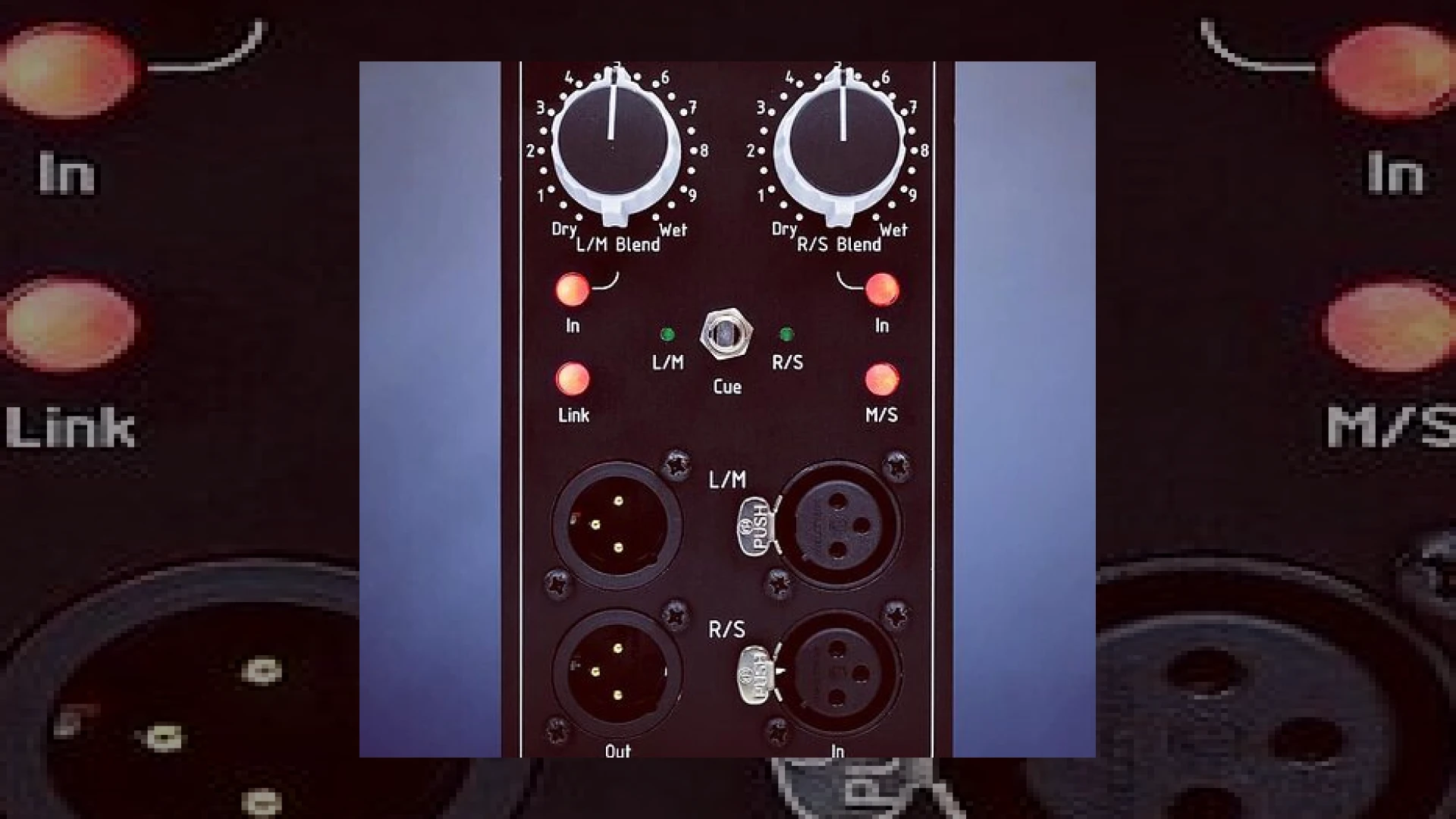
The SM Mastering Audio Articles team often stresses the importance of flexible signal flow. The tk audio m/s blender 500 is built around a multi-functional design that acts simultaneously as a parallel processing module and a mid-side encoder/decoder. On the rear, main inputs and outputs handle the primary signal path, while two pairs of front-panel I/O jacks allow engineers to easily patch in external compressors, EQ units, or saturation devices.
Operationally, the unit provides three distinct modes: Standard, Link, and M/S. In Standard mode, it functions as two independent mono blenders. Engaging the Link feature allows the left blend control to govern both channels, ensuring precise stereo matching. When M/S mode is activated, the sends are encoded into mid and side components, and the returns decode them back into standard left and right stereo information. Furthermore, a comprehensive cue function lets you monitor individual left, right, mid, or side components effortlessly. For additional reading on advanced mastering techniques, you can explore industry standards on platforms like iZotope.
Technical Specifications
| Feature | Specification |
|---|---|
| Name | TK Audio M/S Blender 500 |
| Use | Parallel Processing & M/S Matrix for 500 Series |
| Price | TBD (Announced upon release) |
| Rating | 4.8 / 5 (SM Mastering Expert Evaluation) |
Practical Studio Workflow Tips
Integrating the tk audio m/s blender 500 into your daily sessions unlocks incredible creative flexibility. Here are a few ways to maximize its potential:
* **Parallel Compression on Stereo Busses:** Insert a pair of aggressive compressors into the front panel returns. Use the wet/dry blend controls to mix the crushed signal underneath your pristine dynamic master.
* **Mid-Side Spatial Enhancement:** Activate the M/S mode to independently compress or equalize the center information (vocals, kick, snare) differently from the wide stereo information (synths, guitars, ambience).
* **Precise Monitoring:** Utilize the cue function to solo the “Side” channel, ensuring your phase relationships and stereo width elements are clean before committing to a final mixdown.
Conclusion
For professionals looking to maximize their 500-series chassis, the tk audio m/s blender 500 delivers a robust feature set tailored for modern mixing and mastering demands. Its ability to effortlessly combine parallel blending with a true mid-side matrix makes it an invaluable addition to any outboard gear rack.
Frequently Asked Questions
What format is the TK Audio M/S Blender 500 built for?
The unit is built specifically for the 500-series modular hardware format, making it compatible with standard lunchboxes and power racks.
Can I use the unit for standard dual-mono parallel processing?
Yes. In Standard mode, the module functions as two independent mono blenders, allowing you to process completely unrelated mono sources or unlinked stereo tracks.
How do I monitor the Mid and Side signals?
By engaging the M/S mode, you can use the built-in cue function to isolate and route the Mid or Side signals directly to your main monitoring outputs.
🛒 Official Product Info & Where to Buy
Check full technical specs, pricing, and purchase options directly from the official manufacturer or authorized dealer for TK Audio M/S Blender 500.

Written by SM Mastering
Official content on sound engineering, mixing, mastering, and advanced electronic production by SM Mastering.