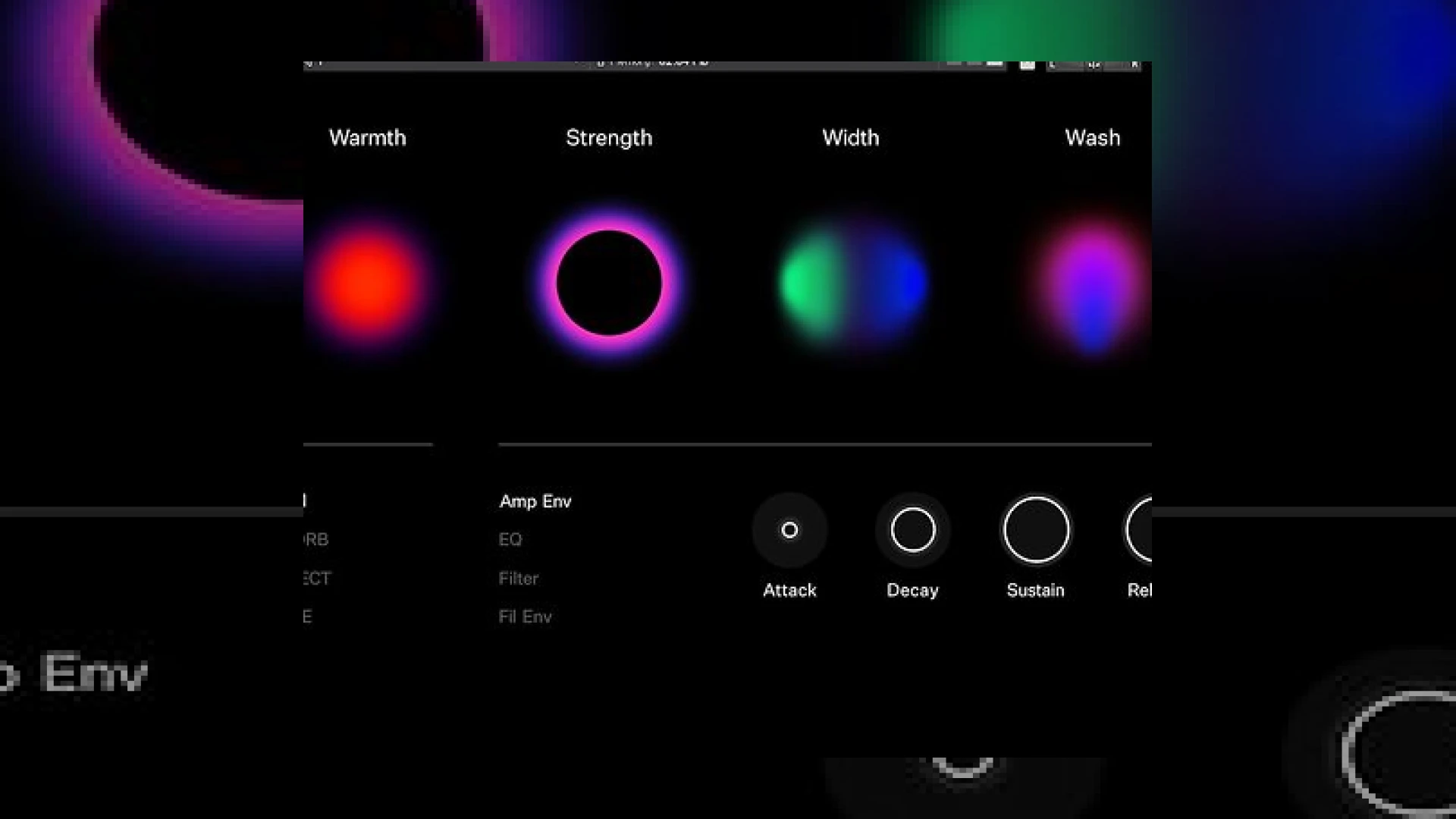
Visual context for Toska from Noon Instruments.
When evaluating cinematic sound design tools and hybrid sample libraries for professional mixing, finding instruments that sit organically in a dense track without clashing with other elements is crucial. As engineers at SM Mastering Audio Articles, we frequently analyze how virtual instruments translate across different playback systems, from massive cinema subwoofers to mobile devices. Released to capture complex, evolving acoustic and electronic textures, **toska from noon instruments** has quickly caught our attention for its unique approach to sound source blending and modulation.
Powered by Native Instruments Kontakt, this 6.5GB library combines heavily processed analog synthesizers, traditional orchestral sections including brass, strings, and woodwinds, raw vocal fragments, and organic field recordings. In this technical review, we examine how to integrate this library into a professional mixing workflow, optimize its dynamic range, and ensure it translates accurately on commercial releases.
Exploring the Architecture of toska from noon instruments
The engine relies on multi-layered sound sources that evolve over time, presenting unique challenges and opportunities during the mixing stage. Because many patches feature inherent pitch, filter, and stereo width modulation, the spatial image can shift dynamically across the stereo field.
When mixing tracks featuring **toska from noon instruments**, engineers should pay close attention to phase correlation and low-end buildup. Because the library layers analog synthesizers with field recordings and acoustic instruments, certain patches can introduce dense low-mid frequency masking. Utilizing dynamic EQ tools—similar to processing workflows recommended by industry standards like iZotope—helps tame transient resonance without sacrificing the organic warmth of the tape and cassette saturation found in the Relics bank.
Preset Banks and Sound Design Potential
The library is divided into three distinct preset categories, each serving a specific production purpose:
* **Instruments Bank:** Comprising 83 patches, this bank delivers lush pads and deep soundscapes. The internal modulations develop organically, meaning a single sustained note can dynamically alter its timbre and stereo footprint over time.
* **Relics Bank:** Featuring 27 patches re-recorded onto physical tape and cassette mediums, this bank introduces gritty, authentic distortion and lo-fi artifacts with minimal digital processing.
* **Curated Presets Bank:** This section pushes the engine further with heavy effects processing, yielding rhythmic pulses, driven leads, and dramatic textures suitable for modern film scoring and electronic music production.
Furthermore, full NKS (Native Instruments Kontrol Standard) support allows for seamless hardware integration, mapping vital macro controls directly to physical knobs for real-time automation writing.
Specifications Table
| Parameter | Detail |
| :— | :— |
| **Product Name** | Toska |
| **Developer** | Noon Instruments |
| **Primary Use** | Cinematic sound design, ambient pads, hybrid orchestral textures |
| **Library Size** | 6.5GB uncompressed sample content |
| **Platform Requirements** | Native Instruments Kontakt or Kontakt Player (version 6.4.2 or later) |
| **Hardware Integration** | Full NKS Support |
| **Operating Systems** | Windows and macOS compatible |
Studio Workflow Tips for Mixing Cinematic Textures
Integrating complex ambient libraries into a professional master requires careful gain staging and frequency management. Here are several practical studio tips for working with **toska from noon instruments** in a session:
1. **Automate Motion, Don’t Just Static Play:** Because the patches feature evolving modulations, use your DAW’s automation lanes to ride filter cutoffs or internal movement controls during transitional sections of your arrangement, preventing the background layers from swallowing your lead elements.
2. **Control Low-End Phase Shifts:** The sub-frequencies generated by layered analog synthesizers can sometimes phase-cancel or crowd your kick and bass channels. Insert a linear-phase high-pass filter or a mid-side EQ on your instrument bus to clean up frequencies below 40Hz.
3. **Use Mid-Side Processing for Width:** The expansive stereo patches benefit greatly from mid-side compression. Narrowing the low-end information to mono while keeping the high-frequency air wide will anchor your mix and ensure mono-compatibility for broadcast standards.
Conclusion
Ultimately, **toska from noon instruments** is a remarkably deep and inspiring tool for modern producers and film composers looking to add organic grit and cinematic movement to their tracks. By understanding its modulation behavior and managing its frequency spectrum during the mixing process, you can easily blend its atmospheric textures into any professional production.
Frequently Asked Questions
### Does toska from noon instruments require the full version of Kontakt?
No, the library is fully compatible with the free Native Instruments Kontakt Player (version 6.4.2 or later), meaning users do not need to purchase the full retail version of Kontakt to run it.
### How much hard drive space is required for installation?
The library contains approximately 6.5GB of high-quality sample content. We recommend installing it on a dedicated internal SSD to ensure fast patch loading times during live sessions or heavy scoring work.
### Does the library support hardware controllers natively?
Yes, **toska from noon instruments** features complete NKS (Native Instruments Kontrol Standard) integration, allowing seamless plug-and-play mapping with Komplete Kontrol keyboards and Maschine hardware.
🛒 Official Product Info & Where to Buy
Check full technical specs, pricing, and purchase options directly from the official manufacturer or authorized dealer for Toska from Noon Instruments.
Written by SM Mastering
Official content on sound engineering, mixing, mastering, and advanced electronic production by SM Mastering.