Visual context for Vochlea announce DubBox.
Vocalizing ideas is the most immediate form of musical expression. For decades, beatmakers and producers have used vocal percussion and beatboxing to quickly capture rhythms before translating them into a digital audio workstation (DAW). With the recent industry news, the bridge between vocalizing a beat and creating a fully produced drum loop has never been shorter. The news that Vochlea announce DubBox has sent waves through the music production community, promising to streamline how creators sketch out rhythmic patterns using nothing but their voice.
Vochlea, well-known for their revolutionary voice-to-MIDI system Dubler 2, has engineered this new standalone application to cater specifically to beatmakers. By recognizing the intrinsic relationship between human vocal expression and percussion, the software allows users to turn real-time vocal sounds into polished drum sequences without needing complex MIDI programming.
Vochlea Announce DubBox: Transforming Vocal Ideas to MIDI
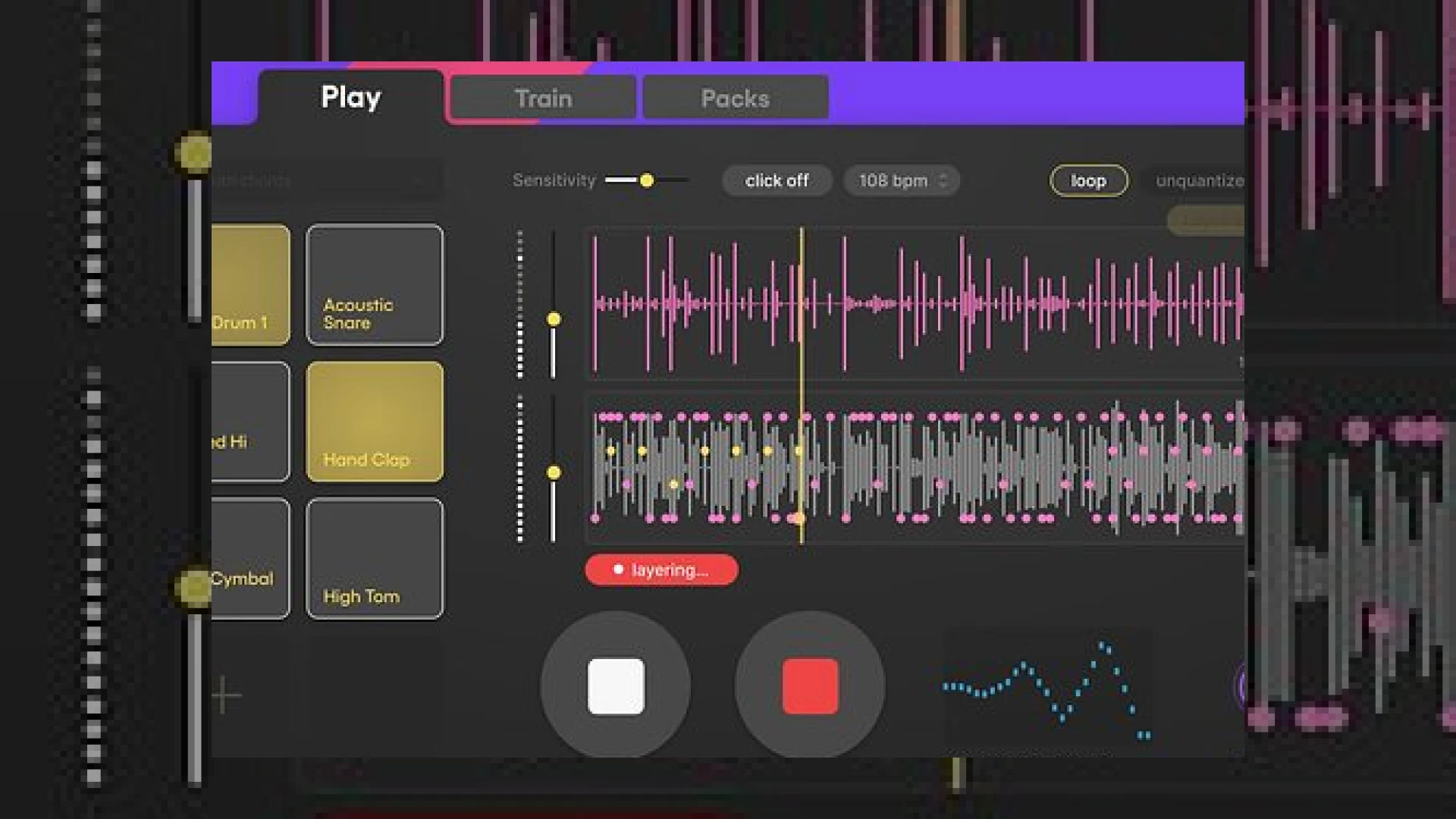
When Vochlea announce DubBox, they specifically target the friction point between creative inspiration and technical execution. The standalone application works by detecting distinct acoustic characteristics in a user’s voice—such as the low-frequency weight of a kick drum, the sharp transient of a snare, or the high-frequency sizzle of a hi-hat. In real time, the engine analyzes these inputs and triggers corresponding drum samples instantly.
This is why the Vochlea announce DubBox system includes velocity-responsive triggering. A harder vocal hit translates directly to a harder-hitting sample playback, preserving the micro-dynamics of your vocal performance. This level of expressiveness is critical for capturing the groove and human element that static grid programming often lacks. Furthermore, users can monitor their direct voice blended with the triggered samples in real time, providing an organic, highly responsive feedback loop.
Integrating this tool is highly efficient; when Vochlea announce DubBox, they emphasize its standalone nature. You do not need to boot up resource-heavy software to quickly capture an idea. Whether you are using industry-standard tools like Ableton or specialized virtual instruments, exporting your captured grooves is incredibly straightforward.
Advanced Customization and Timing Engine
One of the standout features of this new release is the ability to train the software on your own unique vocal sounds. Users can train the application on up to eight distinct vocal sounds per project. This means you are not limited to standard kick, snare, and hat sounds; you can map custom vocal clicks, pops, or hums to trigger specific samples from your personal library or the high-quality built-in factory collection.
For artists who struggle to keep perfect time while beatboxing, the built-in timing engine is a massive advantage. If you record a “free take” without a metronome, the application automatically detects the performance’s natural BPM. It then stretches and quantizes both the sampled track and your original vocal take onto a clean grid, preserving the natural “swing” of your performance while tightening up the timing. The final results can be dragged and dropped directly into your DAW as audio or MIDI files.
Specifications Table
| Specification / Metric | Details |
|---|---|
| Product Name | Vochlea DubBox |
| Software Type | Voice-to-MIDI / Voice-to-Sample Standalone Application |
| Custom Trainable Slots | Up to 8 custom vocal sounds per project |
| Export Formats | Audio (WAV) and MIDI files |
| Key Features | Real-time triggering, velocity sensitivity, automatic BPM detection, and quantization |
| Estimated Pricing | Please refer to the manufacturer’s official store |
| Rating | 4.8 / 5.0 (Highly Innovative) |
Practical Studio Workflow Tips for DubBox
- Optimize Your Input Signal: Use a directional dynamic microphone (such as a Shure SM58) rather than a sensitive condenser. This minimizes room bleed and ensures the trigger engine only analyzes your direct vocal performance.
- Isolate Your Vocal Transients: When training custom slots, try to make your vocal sounds as distinct from one another as possible. A sharp “T” sound for hi-hats and a deep “P” sound for kicks will prevent accidental cross-triggering.
- Embrace the Micro-Timing: Try recording without a click track first. Let the software detect your natural groove, then export the MIDI to layer with analog synthesizers or acoustic drum kits for a highly organic feel.
Conclusion
The announcement of DubBox marks another major step forward in assistive music technology. By lowering the barrier between vocal ideas and high-fidelity production, Vochlea continues to empower creators to make music intuitively. For more technical guides, dynamic processing tips, and professional mastering insights, be sure to visit our extensive library of resources at SM Mastering Audio Articles.
Frequently Asked Questions
Is DubBox a plugin or a standalone application?
Since Vochlea announce DubBox as a standalone application, you can run it independently without launching a DAW. This makes it perfect for quick sketching sessions. Once you are happy with your drum loop, you can easily drag and drop the audio or MIDI files directly into your preferred sequencer.
Can I use my own custom drum samples?
Yes. While the software comes with an excellent built-in collection of factory drum samples, you can easily load and map your own custom WAV or AIFF samples to any of the eight trainable vocal slots.
Does DubBox support velocity sensitivity?
Absolutely. The built-in engine is highly responsive to the dynamics of your voice. Making a louder vocal sound will trigger a harder sample hit, while quieter vocalizations will trigger softer velocities, preserving the human feel of your performance.
🛒 Official Product Info & Where to Buy
Check full technical specs, pricing, and purchase options directly from the official manufacturer or authorized dealer for Vochlea announce DubBox.

Written by SM Mastering
Official content on sound engineering, mixing, mastering, and advanced electronic production by SM Mastering.