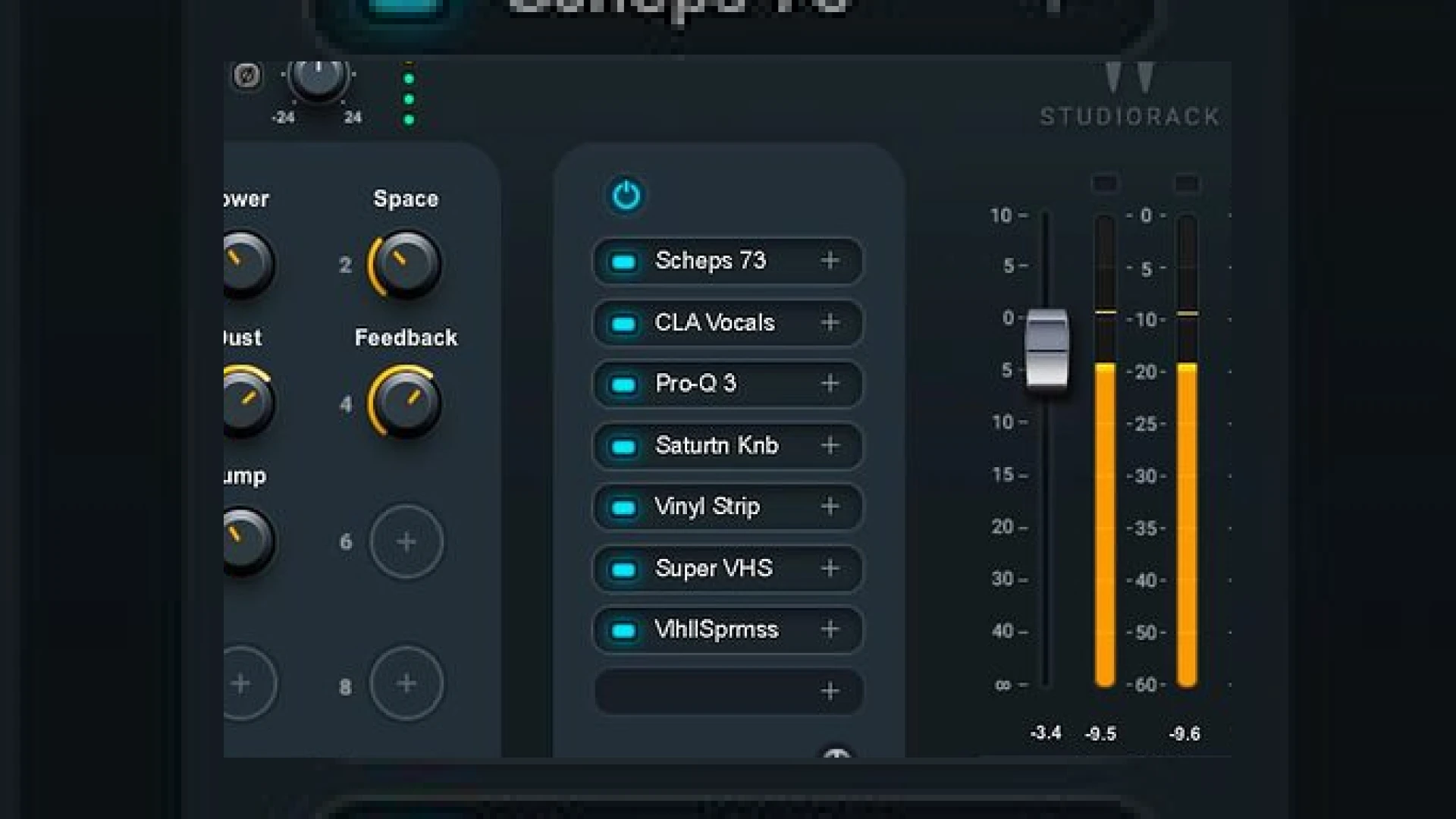
Visual context for Waves StudioRack third-party VST3 support.
Modern mixing and mastering workflows demand extreme efficiency, modular flexibility, and creative freedom. For years, tracking engineers and mix artists have sought seamless ways to combine processing tools across different software ecosystems. The introduction of waves studiorack third-party vst3 support completely transforms how we construct processing chains inside our Digital Audio Workstations (DAWs). By enabling engineers to load third-party VST3 processors alongside native Waves units into a single modular rack, Waves has unlocked unprecedented routing capabilities for both mixing and SM Mastering Audio Articles.
Unlocking Advanced Studio Workflows with Waves StudioRack Third-Party VST3 Support
StudioRack has long been praised as a powerful utility for creating custom multi-effects chains, parallel paths, and multi-band splits on a single DAW insert. However, the limitation of restricting users exclusively to Waves plugins created a barrier for cross-brand powerhouse chains. With the integration of waves studiorack third-party vst3 support, you can now combine your favorite Waves processors with tools from developers like iZotope seamlessly. Imagine driving a saturation plugin into a dynamic EQ, followed by a transparent limiter, all housed within eight modular slots mapped to custom macro controls.
Another major advantage of utilizing waves studiorack third-party vst3 support is bridging format gaps in DAWs with strict plugin compatibility rules. For instance, native Apple Silicon environments running Logic Pro often require specific format bridges, or Pro Tools users face native AAX limitations. StudioRack acts as an efficient host container, allowing you to run external VST3 algorithms smoothly across virtually any host application.
Practical Studio Workflow Tips
- Macro Mapping: Assign multiple parameters from different third-party plugins to a single StudioRack macro knob to sweep filters or blend parallel compression instantly.
- Multi-Band Splitting: Utilize StudioRack’s built-in multi-band split feature to turn any standard third-party VST3 compressor or saturator into a precision frequency-targeted processor.
- Cross-DAW Session Sharing: Save your custom chains locally. Because the routing and plugin states are preserved within the rack, you can effortlessly recall complex processing chains across different DAW platforms when collaborating with other producers.
Waves StudioRack Specifications Table
| Name | Use | Price | Rating |
|---|---|---|---|
| Waves StudioRack | Plugin chain host, parallel routing, and macro control wrapper | Free | 4.9/5 |
Conclusion
The addition of waves studiorack third-party vst3 support redefines what a utility plugin can achieve in a professional mixing environment. By bridging the gap between brand ecosystems, offering robust parallel and multi-band routing options, and simplifying complex macro control setups, it remains an essential tool for any modern engineer. Implementing this workflow into your sessions will undoubtedly speed up your creative process and elevate your final mixes.
Frequently Asked Questions
Can I load Audio Unit (AU) or VST2 plugins using waves studiorack third-party vst3 support?
No, StudioRack specifically targets the VST3 standard for third-party integration. Ensure your external plugins are updated to their VST3 iterations to take full advantage of the host rack.
Is StudioRack free to download?
Yes, Waves offers StudioRack entirely free of charge, making it accessible for any producer or mixing engineer looking to upgrade their internal routing capabilities.
Can I use StudioRack for parallel processing?
Absolutely. StudioRack features internal parallel paths and splitters that let you split audio signals dynamically at any point within your eight-plugin chain.
🛒 Official Product Info & Where to Buy
Check full technical specs, pricing, and purchase options directly from the official manufacturer or authorized dealer for Waves StudioRack third-party VST3 support.
Written by SM Mastering
Official content on sound engineering, mixing, mastering, and advanced electronic production by SM Mastering.