Graillon PLUGIN AUTO TUNE GRAILLON 2.6: Unleash the Power of Vocal Transformation
Graillon PLUGIN AUTO TUNE
Graillon PLUGIN AUTO TUNE Welcome to GRAILLON 2.6
GRAILLON Thank you for choosing AUBURN SOUNDS® GRAILLON 2.6! This guide you through the exciting features of GRAILLON, a tool designed to take your voice on a journey into uncharted territory.
What’s New in Version 2.6?
GRAILLON 2.6 is a significant upgrade, offering more expressive solutions for live voice changing. From correcting vocal tuning to clean, low-latency pitch shifting, GRAILLON 2.6 is carefully tuned for vocals, providing a versatile experience.
Key Features
Tune Correction: Correct the tuning of vocals with precision.
Pitch Shifting: Shift the pitch of vocals cleanly and effortlessly.
Bitcrusher: Add a unique touch to drums and robots with the bitcrusher feature.
Pitch-Tracking Modulation: Experience versatile modulation with a new ring mode.
Recommended Usage
GRAILLON is your go-to tool for:
Correcting vocal tuning
Creating robotic voices
Shifting pitch neatly
Reinforcing the bass of pitched sounds
Making a voice growl
Enhancing a more masculine voice
Compatibility and Installation
GRAILLON is available as a VST2/VST3/Audio Unit/AAX/LV2 plug-in.
Compatible with Windows 7 or later, macOS 10.10 or later, and Ubuntu 16.04 or later.
Installation is straightforward for Windows, macOS, and Linux users.
Parameters: Fine-Tune Your Sound
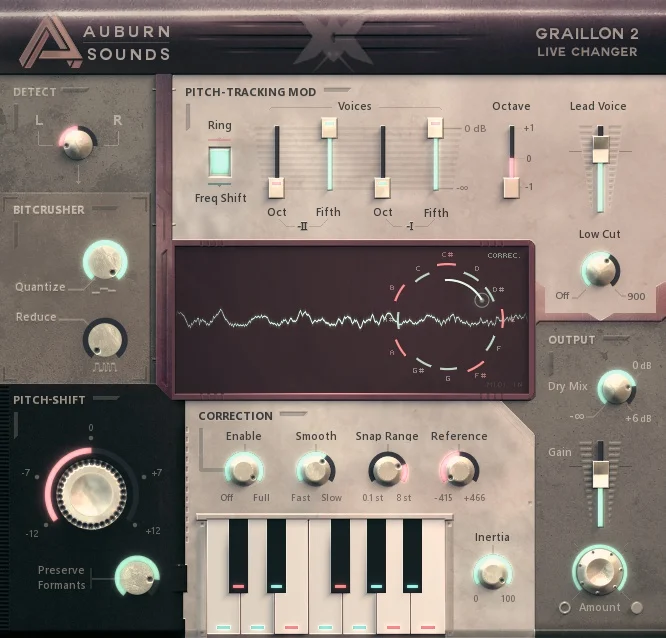
Detect
Left/Right: Choose the channel for pitch detection (default: left).
Bit Crusher
Quantize Rate: Control time quantization.
Bit Reduction: Reduce the number of bits for a unique sound.
Pitch-Shift
Static Pitch Shift: Change the pitch of the input signal.
Preserve Formants: Maintain the original spectral envelope.
Pitch-Correction
Enable Correction: Adjust the amount of pitch correction.
Smooth: Control the transition speed for a natural effect.
Snap Range: Set the range for pitch correction.
Reference Tunes: Define the reference pitch.
Installation Guide
For detailed instructions on installing GRAILLON on Windows, macOS, and Linux, visit our official installation guide.
System Requirements
GRAILLON is compatible with a wide range of Digital Audio Workstations (DAWs) and supports sampling rates from 22050 kHz to 384 kHz.
Credits
GRAILLON is a collaborative effort, and we’d like to thank the individuals who contributed to its development.
Legal Information
Auburn Sounds® is a registered trademark.
GRAILLON uses the D language and the open-source framework Dplug.
External Licenses
GRAILLON contains copyrighted material from Apple Inc. and Sophia Poirier. Read more.
Changelog: What’s New in Version 2.6?
Resizeable UI
Windows desinstaller
Improved latency reporting
Fixed crashes and bugs
Experimental support for Apple Silicon and macOS 11.0 (arm64)
Explore the full changelog for a detailed overview of GRAILLON’s evolution.
FAQ for GRAILLON 2.6 PLUGIN AUTO TUNE
Welcome to GRAILLON 2.6
Thank you for choosing AUBURN SOUNDS® GRAILLON 2.6! This guide will walk you through the exciting features of GRAILLON, a tool designed to take your voice on a journey into uncharted territory.
GRAILLON 2.6 is a significant upgrade, offering more expressive solutions for live voice changing. From correcting vocal tuning to clean, low-latency pitch shifting, GRAILLON 2.6 is carefully tuned for vocals, providing a versatile experience.
Key Features
Tune Correction: Correct the tuning of vocals with precision.
Pitch Shifting: Shift the pitch of vocals cleanly and effortlessly.
Bitcrusher: Add a unique touch to drums and robots with the bitcrusher feature.
Pitch-Tracking Modulation: Experience versatile modulation with a new ring mode.
Recommended Usage
GRAILLON is your go-to tool for:
Correcting vocal tuning
Creating robotic voices
Shifting pitch neatly
Reinforcing the bass of pitched sounds
Making a voice growl
Enhancing a more masculine voice
Compatibility and Installation
Available as: VST2/VST3/Audio Unit/AAX/LV2 plug-in.
Compatible with:
Windows 7 or later
macOS 10.10 or later
Ubuntu 16.04 or later
Installation: Straightforward for Windows, macOS, and Linux users.
Parameters: Fine-Tune Your Sound
Detect
Left/Right: Choose the channel for pitch detection (default: left).
Bit Crusher
Quantize Rate: Control time quantization.
Bit Reduction: Reduce the number of bits for a unique sound.
Pitch-Shift
Static Pitch Shift: Change the pitch of the input signal.
Preserve Formants: Maintain the original spectral envelope.
Pitch-Correction
Enable Correction: Adjust the amount of pitch correction.
Smooth: Control the transition speed for a natural effect.
Snap Range: Set the range for pitch correction.
Reference Tunes: Define the reference pitch.
Installation Guide
For detailed instructions on installing GRAILLON on Windows, macOS, and Linux, visit our official installation guide.
System Requirements
GRAILLON is compatible with a wide range of Digital Audio Workstations (DAWs) and supports sampling rates from 22050 kHz to 384 kHz.
Credits
GRAILLON is a collaborative effort, and we’d like to thank the individuals who contributed to its development.
Legal Information
Auburn Sounds® is a registered trademark.
GRAILLON uses the D language and the open-source framework Dplug.
External Licenses
GRAILLON contains copyrighted material from Apple Inc. and Sophia Poirier. Read more.
Changelog: What’s New in Version 2.6?
Resizeable UI
Windows desinstaller
Improved latency reporting
Fixed crashes and bugs
Experimental support for Apple Silicon and macOS 11.0 (arm64)
Explore the full changelog for a detailed overview of GRAILLON’s evolution.
Feel free to customize this draft based on your preferences or any specific details you’d like to highlight.
SM Mastering
Top 1 on Beatport 🔥🔥🔥
.
Schedule your master now!!!
.
SM Mastering Mixing and Master Services
.
Support and feedback from
.
Nice support and feedbacks from the likes of…
Solomun – Fideles – Carl Cox – Stan Kolev – Armin Van Buuren Benny – Hot Since 82 – Adam Bayer – Maceo Plex – Tale of Us – D-Nox – Anyma – D-Formation – Armin – Morttagua – EDX – Hernan Cattaneo – Joris Voorn – Sasha Carassi – John Digweed – Anderson Noise – Dubfire – Lane 8 – Frankey aka Beckers – Eelke – Kleijn – Pete Tong – Kollektiv Turmstrasse – Kevin de Vries – Chris Fortier – Aly & Fila – Gai Barone – Darin Epsilon – Hidden Empire – Tocadisco – Rauschhaus – Erly Tapeshi – Paul Thomas – Haze-M – Marc Depulse – Animal Picnic – Lonya – Tim Penner – Jos & Eli – Blancah – Dale Middleton – Mariano Mellino – Marco Carola – Miss Melera – Bog – Sabb – Cid Inc – Oliver Weiter – Moonbeam – Mat Joe – Nic Fanciulli – Paco Osuna – Black Coffee – Cristoph – Nicole Moudaber – Citizen Kain – Monastetiq – Chris Lake – Haze-M – Kamilo Sanclemente – Stas Drive – Dash Berlin – Matan Caspi – Steve Parry – Karotte – Nick Varon – Oostil – Sonic Future – Paul Anthonee – Roger Shah – Brancaccio & Aisher – Sezer Uysal – Glenn Morrison – Blake Jarrell – Mantzur – Guy Mantzur – WhoMadeWho – Magdalena – Jerome Isma-Ae – Soul button – Antrim – Audio Junkies – Emi Galvan – Rafael Cerato – Stylo – Space Motion – Wally Lopez – Kintar – Michael-A – Stereo Express – Stereo Underground – Stereocalypse – Rancido – Ame & Navas – Nico Morano – Roger Sanchez – Elfenberg – Redondo – Max Graham – Kyau & Albert – Blake – Philipp Straub – Cherry – Melody Stranger – Uncloak – Loco Dice – Luciano – Paul Van – Dyk – Binaryh – Thomas Schumacher – Danito & Athina – Etch – James Monro – Petar Dundov – Undercatt – Airwave – John 00 Fleming – Matt Darey – Luca Morris – And more!!!